Article
IT systems and administration
Nagios – Comprehensive IT Monitoring System
In today's world, where organizations rely on digital technology to run their operations, the reliability of IT systems is crucial. System or server failure can result in significant financial losses and a loss of customer trust. Therefore, monitoring IT infrastructure is becoming an integral part of maintaining high service availability. Among monitoring tools, Nagios holds a special place.
What is Nagios?
Nagios is an open-source software solution for monitoring systems, networks, and applications. Its primary goal is to provide IT administrators with a comprehensive view of the IT infrastructure and rapid response to issues. Nagios is flexible and scalable, allowing it to be adapted to a variety of needs. It utilizes a plug-in-based architecture, allowing users to extend its functionality to monitor virtually any device or service. This flexibility, combined with its scalability and reliability, has solidified its position.
How does Nagios work?
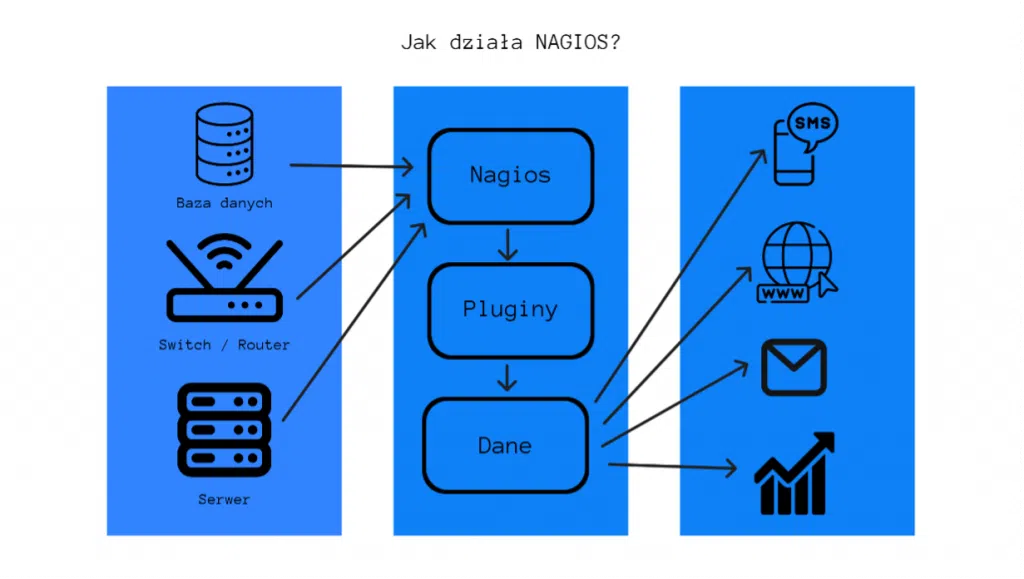
Nagios operates through configurable scripts that monitor the status of various IT infrastructure components. These can include server status, network bandwidth, resource usage levels, and service availability. After executing the script, Nagios analyzes the results and takes appropriate corrective or other actions, such as sending notifications and recording logs.
Tool description
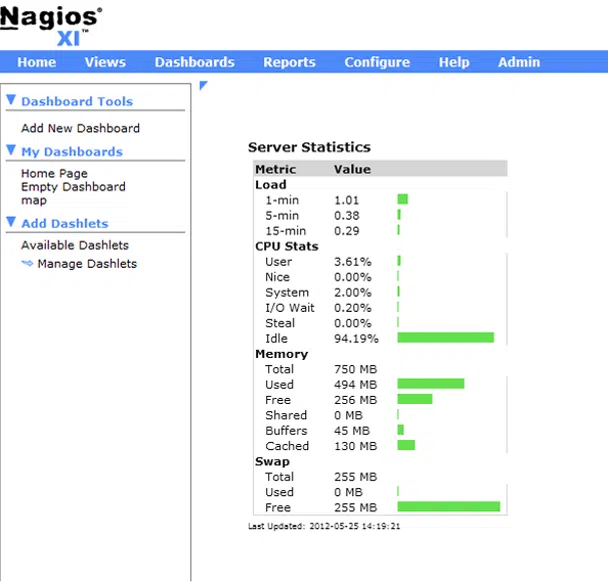
- Views
This section of the system is responsible for viewing current statistics and components. By default, Nagios displays a new tab with the current views every minute.
- Dashboards
This is a configurable panel that allows you to display all components supported by Nagios. Multiple components, prepared by the manufacturer or a third-party developer, can be quickly added to any dashboard.
- Reports
This section is used for reporting and creating summaries of information generated by the system. Among the most important features are host availability and all logs.
- Configure
A wizard that allows you to specify monitored services and actions in the event of a failure, step by step.
- Admin
The administration panel for managing Nagios, creating users, and configuring basic functions.
Nagios's main features
Service Monitoring:
Nagios enables monitoring of both standard network services such as HTTP, FTP, and SMTP, as well as custom business applications. This allows organizations to effectively ensure the high availability and reliability of their systems, minimizing the risk of downtime.
Alerts:
When a failure or problem is detected, Nagios can automatically send notifications to administrators via email or SMS.
Event Management:
Nagios allows you to manage, categorize, and prioritize reported events.
Reports and Charts:
Nagios provides tools for generating charts and reports based on collected data, allowing you to analyze trends and detect potential problems in advance.
Benefits of using Nagios
Increased service availability:
Monitoring your IT infrastructure allows you to quickly detect failures and problems, minimizing service downtime.
Resource optimization:
Nagios enables resource utilization analysis, allowing you to optimize your IT infrastructure and avoid overloads.
Fast response to problems:
Automatic notifications keep administrators informed of problems in real time, allowing for quick response and minimizing losses.
Improved performance:
Regular monitoring of your IT infrastructure allows you to identify and eliminate potential performance issues, resulting in improved service quality.
Practical applications
Enterprises:
Large enterprises use Nagios to monitor their IT resources, including servers, networks, storage, and applications. Nagios's scalability and flexibility make it an ideal choice for managing complex environments.
Service Providers:
Service providers, such as hosting and cloud providers, rely on Nagios to deliver high-quality service to their customers. Nagios enables them to monitor, enforce SLAs, and report on the performance of their services.
DevOps:
Continuous delivery (CD) is the process of automating, testing, and deploying to a production environment. Continuous monitoring with Nagios helps DevOps teams detect issues early, enabling rapid response. Nagios plays a key role in ensuring the availability of applications and microservices.
Summary
In the rapidly evolving IT industry, effective monitoring has become fundamental to daily operations. Thanks to its robust design and large user community, Nagios has become a pioneer in this field. Organizations worldwide leverage its capabilities to achieve their goals. Nagios helps maintain service levels and ensure business continuity. This increases the potential efficiency of IT infrastructure, accelerating development and innovation within an organization.
Your IT.
our
support.
our
support.
Contact us
FAQ
What does an IT company do? What IT solutions do we use at Support Online?
When is it worth using an IT company?
Why is it worth hiring an IT company rather than a freelance IT specialist?
What are the advantages of working with IT Support Online?
What IT solutions do we use at Support Online?
When is it worth using an IT company?
Why is it worth hiring an IT company rather than a freelance IT specialist?
What are the advantages of working with IT Support Online?
What IT solutions do we use at Support Online?
When is it worth using an IT company?
Why is it worth hiring an IT company rather than a freelance IT specialist?
What are the advantages of working with IT Support Online?
An IT company, or IT firm, deals with information technology in a broad sense. This includes, among other things:
- Software design and development: An IT company can create custom applications for other companies or software products for the mass market. Depending on their specialization, these can include mobile applications, desktop applications, web applications, or embedded systems.
- Consulting services: An IT company often provides experts to advise on implementing new technologies, optimizing business processes, or selecting appropriate technological solutions.
- Cloud solutions: Many IT companies specialize in implementing and managing cloud solutions, such as data storage, application hosting, and data analysis platforms.
- IT security: Protection against cyberattacks, security audits, implementing security policies, and network monitoring are just some of the IT companies' responsibilities in this area.
- IT infrastructure management: In this area, a company may manage servers, databases, networks, and endpoints.
- Technical Support and Service: An IT company may provide support for its own products or general IT support for other companies, managing their technology on a daily basis.
- Training: Many IT providers also offer training in software use and secure technology use.
- Hardware Solutions: Some IT companies may also provide and configure computer, server, or network hardware.
Depending on their specialization and size, an IT company may offer one, several, or all of the above solutions. When choosing a provider, it's important to thoroughly understand their services and tailor them to your individual needs.
At Support Online, we have been supporting companies for years with
- comprehensive user support (both on-site and remotely),
- we service computers, phones, tablets, and related network issues,
- we specialize in server administration: Windows, Linux/Unix,
- we support virtualizers such as KVM, Hyper-V, VMWare, and Proxmox,
- we support cloud services, particularly solutions such as Azure, Microsoft 365, and AWS,
- we monitor servers and devices on the internet,
- we consult on development, DRP, and support the stability of your business in the IT layer.
If you're looking for a good IT company, Support Online is the right place to grow your business.
It's worth using an IT company like Support Online when:
- You plan to implement new technologies or software in your company.
- You need specialized technology consulting.
- You want to optimize existing IT processes.
- You struggle with digital security issues.
- You need support in managing your IT infrastructure.
- You lack internal resources or expertise to implement certain technology projects.
Using external IT experts can bring benefits in terms of saving time and resources, and ensuring high-quality solutions.
Hiring an IT company like Support Online offers several key benefits over an IT freelancer:
- Support from the entire team: An IT company has a full team of specialists, from DevOps specialists and Cyber Security Specialists to IT Helpdesk Specialists, who possess diverse skills and experience, enabling faster problem resolution and the implementation of more complex projects.
- Reliability and stability: IT companies have an established reputation and track record, which can translate into greater reliability and stability of services.
- Maintenance and support: An IT company can offer service contracts, warranties, and after-sales support, which may be more difficult to obtain from an individual freelancer.
- Resources: Companies have access to more resources, tools, and technologies that can accelerate and improve project execution.
- Long-term availability: The risk of a freelancer disappearing or changing careers is greater than the risk of a well-established company going out of business.
However, it's worth noting that the choice between a company and a freelancer depends on your specific needs and situation. If you value peace of mind and a quick response to unexpected problems, it is worth choosing an IT company such as Support Online.
Partnering with IT Support Online offers the following advantages:
- Professional IT outsourcing: The company guarantees high-quality IT outsourcing services for businesses of all sizes.
- Comprehensive IT support: IT Support Online provides comprehensive IT support that meets the diverse needs of businesses.
- Saves time and money: With our support, clients can focus on their core business activities while reducing the costs associated with information technology management.
- Serving a diverse range of businesses: The company specializes in serving both small and medium-sized enterprises and large corporations, demonstrating its flexibility and ability to adapt to diverse client needs.
- Leadership in IT outsourcing: The company is recognized as a leader in IT outsourcing, particularly in the Poznań and Warsaw regions.
By partnering with our company, IT Support Online, businesses can count on a high standard of service and professionalism at every stage of the relationship.


