Case study
migrations and backups
Case Study: Implementing Hardened Backup in Microsoft Azure.
In his article "Veeam Hardened Repository – What Is It and How It Protects Backups from Ransomware in 2026," published on our website, Dawid Młynarski uses the metaphor of a fire extinguisher – a backup that we only remember when a fire breaks out. He also explains why, in the era of ransomware, a simple "fire extinguisher" isn't enough and why you need Hardened Backup.
The theory sounds solid: data immutability, modification blocking, Write Once, Read Many technology. But how do you translate these concepts from presentation slides to a real-world IT infrastructure?
And more importantly, how do you do it in the cloud to gain an additional layer of off-site security?
We'll take a closer look at our latest implementation: Veeam Hardened Backup based on the Azure cloud.
The Challenge: Ransomware and NAS Backup Security
Our client, a mid-sized company, previously relied exclusively on on-premises infrastructure and backups sent to NAS. During the launch audit, we identified that this solution currently has critical vulnerabilities:
- Lack of logical separation:
If ransomware encrypts the local network, the NAS can also be infected. - Lack of physical separation:
A fire, flood, or electrical surge can destroy both the original data and the backups simultaneously. - Financial Barrier:
Building a second physical data center (DR site) is too expensive. - Regulatory Pressure:
Some companies must comply with the NIS2 directive, which emphasizes diversifying backup locations.
Goal: To provide an untouchable copy of data off-site without investing in physical hardware.
Solution: Immutable Cloud Backup (Azure Blob Storage)
In a cloud environment, the equivalent of a "hardened repository" on Linux is Azure Blob Storage with immutability enabled.
We based our implementation on three key steps:
Cost Calculation
The fear of a "cloud horror bill" is the most common barrier to implementation.
Wrongly. Azure Blob Storage costs are predictable, as long as we know how to calculate them.
We used the official Azure Pricing Calculator to estimate the budget for our implementation.
Creating a Container in Azure
We created a dedicated storage account in Azure.
A key element of the configuration was enabling versioning and enabling version-level immutability support.
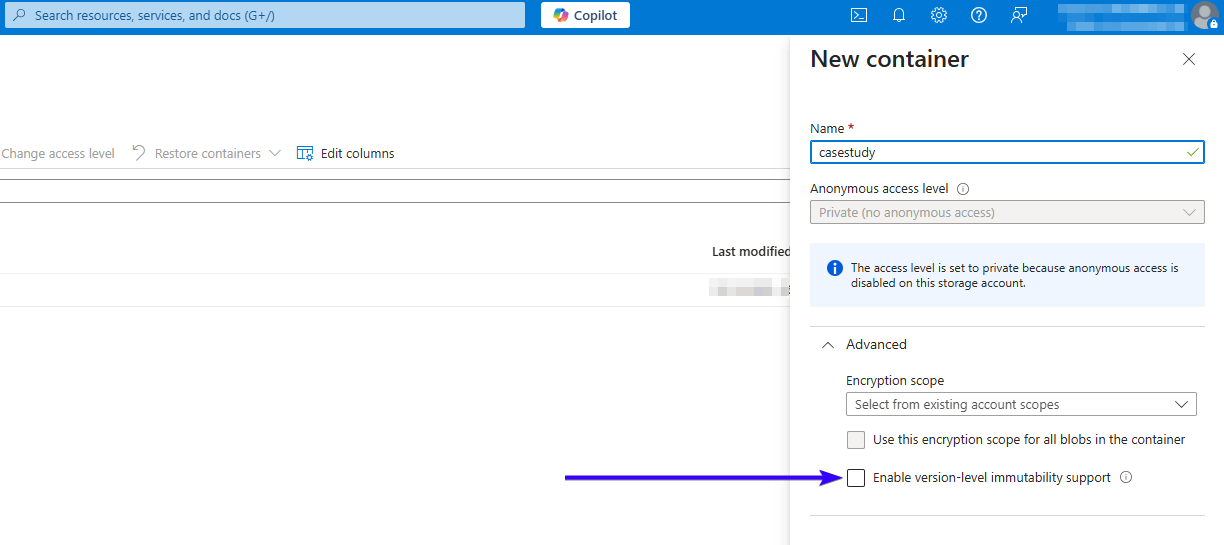
Fig 1. Microsoft Azure panel view: Enabling the “Version-level immutability support” option for a new container.
Veeam Configuration:
On the Veeam Backup & Replication side, we added a new "Object Storage" repository. During configuration, we selected the "Make backups immutable" option.
For this company, we set this period to 30 days. What does this mean?
Every block of data sent to the Azure cloud receives a digital padlock.
For 30 days after the write, no one – neither a hacker nor an administrator – can overwrite or delete this file.
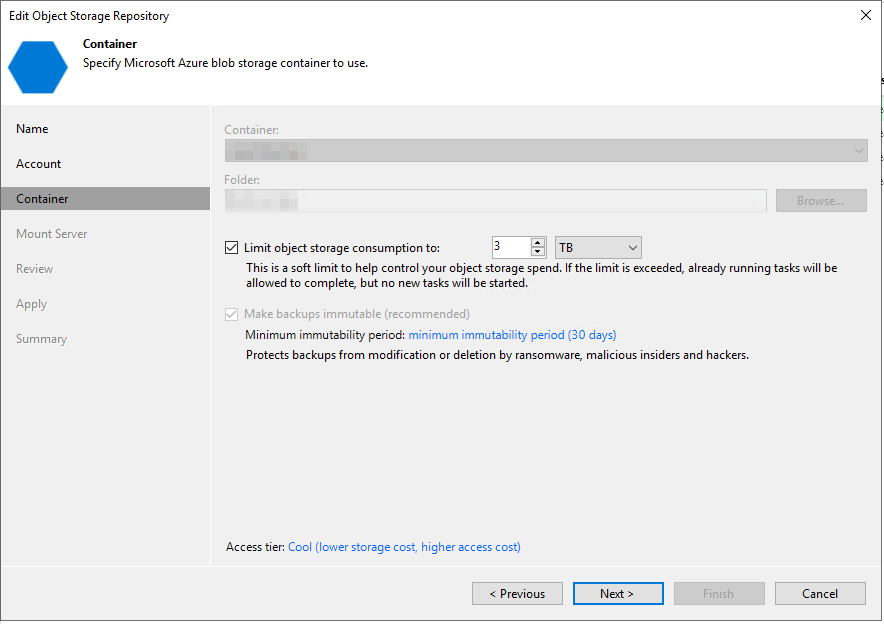
Fig. 2. Repository configuration view from Veeam B&R
The end result:
Implementing Hardened Backup has transformed the company's security architecture in several ways:
- Ransomware protection: Even if the local infrastructure is fully encrypted, the cloud copy remains intact thanks to the Object Lock mechanism.
- Compliance with the 3-2-1-1-0 principle: The company has three copies of data, on two different media: one off-site (Azure), one offline/immutable copy (Immutability), and zero recovery errors (We check backups daily).
- Privilege Separation: An attacker who gains control of the local domain controller (AD) has no control over the Azure account, creating an effective barrier.
Why connect Veeam with Microsoft Azure?
Implementing Hardened Backup in the cloud is a strategic move for several reasons:
- Speed of implementation: You don't have to wait for servers to be delivered.
We launch the secure repository at any time. - Scalability: Running out of backup space?
In the cloud, this problem doesn't exist – the repository grows with your data. - Compliance with standards: Azure has compliance certifications (including GDPR, HIPAA, and ISO), which facilitates security audits.
Is Hardened Backup in Azure expensive?
Answer: No, with Azure's Pay-As-You-Go subscription model, you only pay for what you use, and costs are predictable.
What is Immutability in Veeam?
Answer: It's a data immutability technology that prevents data from being deleted or encrypted for a specified period of time.
Conclusion
Ransomware is evolving, but so are our defense methods. Implementing Hardened Backup in Microsoft Azure is a shift from "having a backup" to "having a guarantee of data recovery." It's an investment in business stability.
Not sure if your current infrastructure allows for Hardened Backup in the cloud?
Or perhaps you're concerned about the costs associated with Azure? Don't worry.
Contact us and get a free Azure cost estimate for your backup.
Your IT.
our
support.
our
support.
Contact us
FAQ
What does an IT company do? What IT solutions do we use at Support Online?
When is it worth using an IT company?
Why is it worth hiring an IT company rather than a freelance IT specialist?
What are the advantages of working with IT Support Online?
What IT solutions do we use at Support Online?
When is it worth using an IT company?
Why is it worth hiring an IT company rather than a freelance IT specialist?
What are the advantages of working with IT Support Online?
What IT solutions do we use at Support Online?
When is it worth using an IT company?
Why is it worth hiring an IT company rather than a freelance IT specialist?
What are the advantages of working with IT Support Online?
An IT company, or IT firm, deals with information technology in a broad sense. This includes, among other things:
- Software design and development: An IT company can create custom applications for other companies or software products for the mass market. Depending on their specialization, these can include mobile applications, desktop applications, web applications, or embedded systems.
- Consulting services: An IT company often provides experts to advise on implementing new technologies, optimizing business processes, or selecting appropriate technological solutions.
- Cloud solutions: Many IT companies specialize in implementing and managing cloud solutions, such as data storage, application hosting, and data analysis platforms.
- IT security: Protection against cyberattacks, security audits, implementing security policies, and network monitoring are just some of the IT companies' responsibilities in this area.
- IT infrastructure management: In this area, a company may manage servers, databases, networks, and endpoints.
- Technical Support and Service: An IT company may provide support for its own products or general IT support for other companies, managing their technology on a daily basis.
- Training: Many IT providers also offer training in software use and secure technology use.
- Hardware Solutions: Some IT companies may also provide and configure computer, server, or network hardware.
Depending on their specialization and size, an IT company may offer one, several, or all of the above solutions. When choosing a provider, it's important to thoroughly understand their services and tailor them to your individual needs.
At Support Online, we have been supporting companies for years with
- comprehensive user support (both on-site and remotely),
- we service computers, phones, tablets, and related network issues,
- we specialize in server administration: Windows, Linux/Unix,
- we support virtualizers such as KVM, Hyper-V, VMWare, and Proxmox,
- we support cloud services, particularly solutions such as Azure, Microsoft 365, and AWS,
- we monitor servers and devices on the internet,
- we consult on development, DRP, and support the stability of your business in the IT layer.
If you're looking for a good IT company, Support Online is the right place to grow your business.
It's worth using an IT company like Support Online when:
- You plan to implement new technologies or software in your company.
- You need specialized technology consulting.
- You want to optimize existing IT processes.
- You struggle with digital security issues.
- You need support in managing your IT infrastructure.
- You lack internal resources or expertise to implement certain technology projects.
Using external IT experts can bring benefits in terms of saving time and resources, and ensuring high-quality solutions.
Hiring an IT company like Support Online offers several key benefits over an IT freelancer:
- Support from the entire team: An IT company has a full team of specialists, from DevOps specialists and Cyber Security Specialists to IT Helpdesk Specialists, who possess diverse skills and experience, enabling faster problem resolution and the implementation of more complex projects.
- Reliability and stability: IT companies have an established reputation and track record, which can translate into greater reliability and stability of services.
- Maintenance and support: An IT company can offer service contracts, warranties, and after-sales support, which may be more difficult to obtain from an individual freelancer.
- Resources: Companies have access to more resources, tools, and technologies that can accelerate and improve project execution.
- Long-term availability: The risk of a freelancer disappearing or changing careers is greater than the risk of a well-established company going out of business.
However, it's worth noting that the choice between a company and a freelancer depends on your specific needs and situation. If you value peace of mind and a quick response to unexpected problems, it is worth choosing an IT company such as Support Online.
Partnering with IT Support Online offers the following advantages:
- Professional IT outsourcing: The company guarantees high-quality IT outsourcing services for businesses of all sizes.
- Comprehensive IT support: IT Support Online provides comprehensive IT support that meets the diverse needs of businesses.
- Saves time and money: With our support, clients can focus on their core business activities while reducing the costs associated with information technology management.
- Serving a diverse range of businesses: The company specializes in serving both small and medium-sized enterprises and large corporations, demonstrating its flexibility and ability to adapt to diverse client needs.
- Leadership in IT outsourcing: The company is recognized as a leader in IT outsourcing, particularly in the Poznań and Warsaw regions.
By partnering with our company, IT Support Online, businesses can count on a high standard of service and professionalism at every stage of the relationship.


