Article
cloud and virtualization
VMware – description of the tool and its capabilities
With ever-evolving business and technology requirements, virtualization is gaining importance as an essential element of enterprise IT infrastructure. VMware, a leader in this field, offers advanced solutions that help organizations achieve greater performance, security, and scalability. By separating physical hardware resources from virtual environments, VMware enables better utilization of existing resources,...
What is virtualization and what is it used for?
Virtualization is the process of simulating logical resources on a single physical machine. In other words, on a single device, we can create several virtual machines, such as servers, workstations, network devices, or data storage devices. Here are some of the main goals and applications of virtualization:
- Consolidation: It allows multiple virtual machines to run on a single physical server, increasing hardware efficiency and reducing costs.
- Isolation: Each virtual machine is isolated from others, improving security and stability because system problems on one machine do not directly impact others.
- Testing: It allows for the creation of isolated test and development environments without the need to invest in additional hardware.
- Ease of management and migration: It enables centralized management, making work easier and faster. Virtual machines can also be easily moved between hosts, simplifying resource management and providing flexibility.
- Disaster recovery and business continuity: Virtualization enables faster and more efficient backups and disaster recovery.
- Application and Workload Optimization: Allows for better matching of computing resources to the needs of specific systems or applications, which increases performance.
Hypervisor
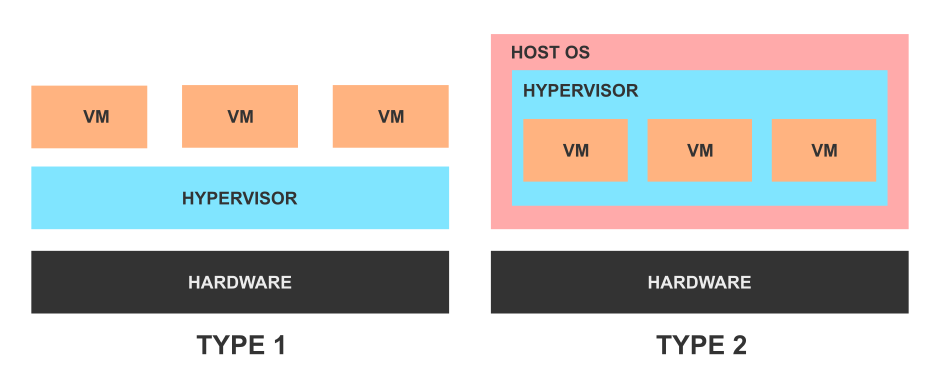
Before exploring the various VMware tools, it's worth understanding the term "hypervisor" and its classification. It primarily manages processes between physical and virtual resources. For example, it manages the order in which virtual machines use their CPUs to prevent interference, or, if necessary, emulates a central processing unit (CPU). Despite the many virtualization technologies available, we can distinguish two types of hypervisors:
- Type 1 (bare metal): Runs directly on the physical hardware, maintaining full control over it without the intervention of a host operating system.
- Type 2 (hosted): Runs as software, installed on a traditional operating system such as Windows, macOS, or Linux. It serves as an emulator for virtualization environments.
What is VMware?
VMware is an American company that provides software for virtualization and building cloud infrastructure. VMware's solution offerings include a variety of options, depending on the needs of a specific company considering implementing virtualization in its environment. Initially, the sheer number of VMware products can be overwhelming; the manufacturer's website alone lists as many as 179 different services. However, most of them are just single tools, created for a specific purpose. The main and most popular solutions are:
VMware vSphere
VMware's most well-known product, a virtualization platform that serves as the foundation for building and managing virtual infrastructure. vSphere consists of many components, the most important of which are:
- VMware ESXi – a Type 1 hypervisor offering full virtualization with hardware acceleration. The installation process is identical to that of operating systems – ESXi is installed from an ISO image. The host on which ESXi is installed provides its own browser-based panel called VMware Host Client. This is used to manage ESXi servers not connected to the vCenter Server environment. It allows for the creation of virtual machines, host administration, and troubleshooting. It is also useful in the event of a vCenter Server failure.
- VMware vCenter Server - manages all connected hosts and virtual machines from a single, centralized interface. It runs continuously in the background, monitoring the infrastructure, sending notifications and alerts, and performing automated administrative tasks. vCenter Server is installed and launched on the ESXi host in a preconfigured virtual machine running Photon OS – VMware's virtualization-optimized Linux distribution.
- VMware vCenter Server Agent - a program installed on each ESXi host added to vCenter Server, which communicates directly with the host.
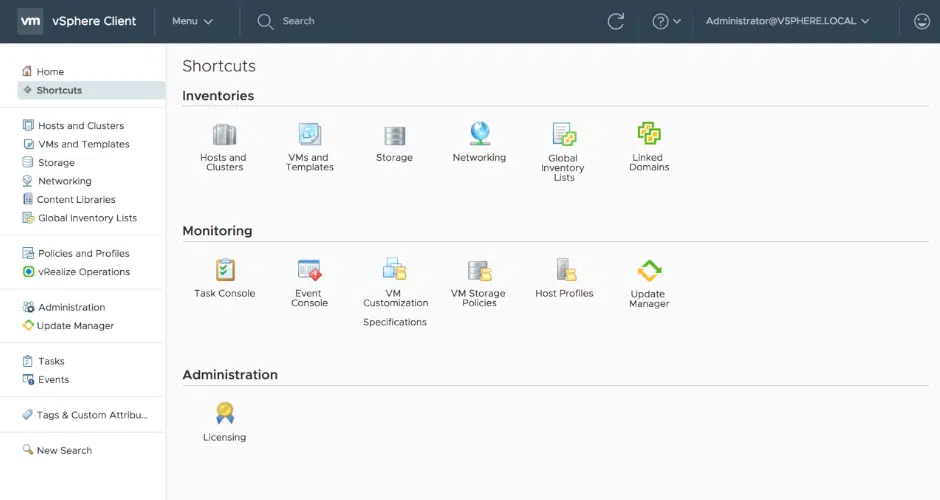
- VMware vSphere Client - an HTTP client that allows you to access vCenter Server from a browser.
VMware vSAN
Storage virtualization software that enables the management of compute and storage through a single platform. Built into the core of the VMware vSphere virtualization platform, vSAN optimizes data flow to ensure maximum performance with minimal CPU and memory usage.
VMware NSX
Just as server virtualization allows for the separation of operating systems and applications from the computer hardware, VMware NSX enables the separation of networks and network services from the network hardware. It can therefore be considered a software-defined network virtualization platform. Like almost all VMware products, it can also be integrated with the vSphere platform. One of NSX's key features is micro-segmentation, which allows for the precise definition of security policies at the level of individual virtual machines. This enhances security within the environment by limiting network traffic to only necessary and trusted connections.
Workstation Player oraz Workstation Pro
VMware products are designed for various virtualization applications on personal computers running Windows or Linux. What are the differences? Workstation Player is primarily aimed at individuals, students, and schools, offering basic virtualization functionality, while Workstation Pro is designed for professionals and enterprises requiring advanced virtualization features. The Player version is free.
VMware Fusion
Like the Workstation products, Fusion is designed for virtualization on personal computers, except that it is targeted exclusively at macOS users.
Summary
VMware's product diversity provides a wide range of options tailored to the varying needs of businesses and individual users, offering flexibility and performance at various levels of virtualization. This ensures that VMware remains a key player in virtualization, enabling companies worldwide to maximize the efficiency and security of their IT infrastructure.
Your IT.
our
support.
our
support.
Contact us
FAQ
What does an IT company do? What IT solutions do we use at Support Online?
When is it worth using an IT company?
Why is it worth hiring an IT company rather than a freelance IT specialist?
What are the advantages of working with IT Support Online?
What IT solutions do we use at Support Online?
When is it worth using an IT company?
Why is it worth hiring an IT company rather than a freelance IT specialist?
What are the advantages of working with IT Support Online?
What IT solutions do we use at Support Online?
When is it worth using an IT company?
Why is it worth hiring an IT company rather than a freelance IT specialist?
What are the advantages of working with IT Support Online?
An IT company, or IT firm, deals with information technology in a broad sense. This includes, among other things:
- Software design and development: An IT company can create custom applications for other companies or software products for the mass market. Depending on their specialization, these can include mobile applications, desktop applications, web applications, or embedded systems.
- Consulting services: An IT company often provides experts to advise on implementing new technologies, optimizing business processes, or selecting appropriate technological solutions.
- Cloud solutions: Many IT companies specialize in implementing and managing cloud solutions, such as data storage, application hosting, and data analysis platforms.
- IT security: Protection against cyberattacks, security audits, implementing security policies, and network monitoring are just some of the IT companies' responsibilities in this area.
- IT infrastructure management: In this area, a company may manage servers, databases, networks, and endpoints.
- Technical Support and Service: An IT company may provide support for its own products or general IT support for other companies, managing their technology on a daily basis.
- Training: Many IT providers also offer training in software use and secure technology use.
- Hardware Solutions: Some IT companies may also provide and configure computer, server, or network hardware.
Depending on their specialization and size, an IT company may offer one, several, or all of the above solutions. When choosing a provider, it's important to thoroughly understand their services and tailor them to your individual needs.
At Support Online, we have been supporting companies for years with
- comprehensive user support (both on-site and remotely),
- we service computers, phones, tablets, and related network issues,
- we specialize in server administration: Windows, Linux/Unix,
- we support virtualizers such as KVM, Hyper-V, VMWare, and Proxmox,
- we support cloud services, particularly solutions such as Azure, Microsoft 365, and AWS,
- we monitor servers and devices on the internet,
- we consult on development, DRP, and support the stability of your business in the IT layer.
If you're looking for a good IT company, Support Online is the right place to grow your business.
It's worth using an IT company like Support Online when:
- You plan to implement new technologies or software in your company.
- You need specialized technology consulting.
- You want to optimize existing IT processes.
- You struggle with digital security issues.
- You need support in managing your IT infrastructure.
- You lack internal resources or expertise to implement certain technology projects.
Using external IT experts can bring benefits in terms of saving time and resources, and ensuring high-quality solutions.
Hiring an IT company like Support Online offers several key benefits over an IT freelancer:
- Support from the entire team: An IT company has a full team of specialists, from DevOps specialists and Cyber Security Specialists to IT Helpdesk Specialists, who possess diverse skills and experience, enabling faster problem resolution and the implementation of more complex projects.
- Reliability and stability: IT companies have an established reputation and track record, which can translate into greater reliability and stability of services.
- Maintenance and support: An IT company can offer service contracts, warranties, and after-sales support, which may be more difficult to obtain from an individual freelancer.
- Resources: Companies have access to more resources, tools, and technologies that can accelerate and improve project execution.
- Long-term availability: The risk of a freelancer disappearing or changing careers is greater than the risk of a well-established company going out of business.
However, it's worth noting that the choice between a company and a freelancer depends on your specific needs and situation. If you value peace of mind and a quick response to unexpected problems, it is worth choosing an IT company such as Support Online.
Partnering with IT Support Online offers the following advantages:
- Professional IT outsourcing: The company guarantees high-quality IT outsourcing services for businesses of all sizes.
- Comprehensive IT support: IT Support Online provides comprehensive IT support that meets the diverse needs of businesses.
- Saves time and money: With our support, clients can focus on their core business activities while reducing the costs associated with information technology management.
- Serving a diverse range of businesses: The company specializes in serving both small and medium-sized enterprises and large corporations, demonstrating its flexibility and ability to adapt to diverse client needs.
- Leadership in IT outsourcing: The company is recognized as a leader in IT outsourcing, particularly in the Poznań and Warsaw regions.
By partnering with our company, IT Support Online, businesses can count on a high standard of service and professionalism at every stage of the relationship.


