Article
cloud and virtualization
Microsoft Cloud: OneDrive Guide
In today's digital revolution, more and more services and applications are moving to the cloud. Have you ever wondered what it actually is and how to start using it? It's proving to be a modern, secure, and incredibly efficient solution. One of the leaders in this field is Microsoft, offering its cloud application platform under the name Microsoft 365.
One of the leaders in this field is Microsoft, offering its cloud application platform called Microsoft 365. In this article, we'll take a closer look at the cloud, explain how to use OneDrive, and compare it to its popular competitor. So let's get started!
How does the Microsoft cloud work?
Infrastructure and servers: Microsoft maintains massive data centers around the world where your data is stored. This is where everything happens!
Internet access: Your data is accessible via an internet connection, regardless of whether you're working on a computer, tablet, or smartphone.
Cloud services: Apps and tools available in the Microsoft 365 cloud are updated automatically, so you're always using the latest versions.
Benefits of using the Microsoft 365 cloud:
- Flexibility and mobility – Work wherever you want,
- Communication – Collaborate in real time,
- Modern tools – Teams, SharePoint, OneDrive, and many more!
- Security – You decide who has access to and edits your files.
OneDrive - what is it for?
Would you like your files to be always accessible and secure? OneDrive is here to help. An application that simplifies data management and makes storing them simpler and more efficient. With OneDrive, you can sync your files across devices, share them with others, and create backups.
How to get started?
You can use OneDrive for free! Simply create an account on the manufacturer's website. This will give you 5 GB of space for your files. However, if you need more space, Microsoft has prepared extended plans that offer up to 1 TB of cloud storage.
How to move your files to OneDrive?
It's simple! If you've already created an account, simply find the previously mentioned application on the Microsoft365 website. You'll see an interface where you can create folders, add your files, and share them with others. Microsoft offers a desktop application for subscribers. With its help, we can facilitate the process of transferring files and making backups.
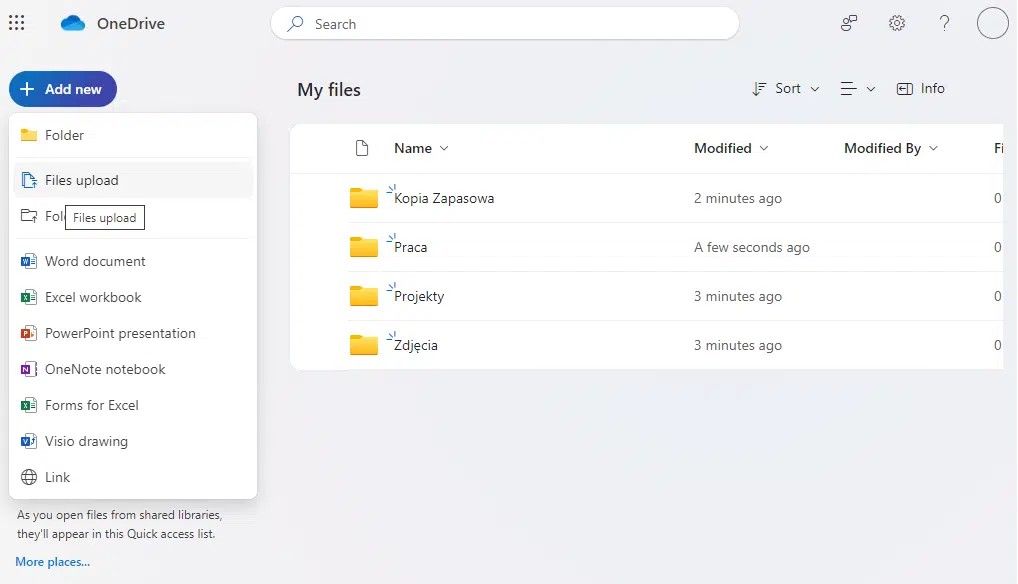
Adding files to OneDrive in a browser
Is OneDrive unrivaled?
There are many competitors on the market. Google Drive also offers file storage, sharing, and backup. Offers are tailored to your needs. The company offers Google Workspace for its corporate plan subscribers, offering up to 5 TB of cloud storage.
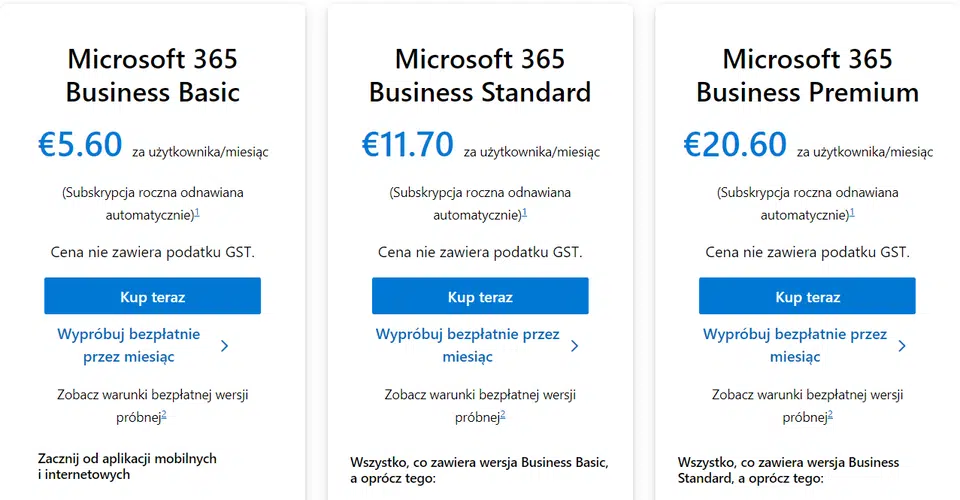
Microsoft 365 License Price List for Businesses
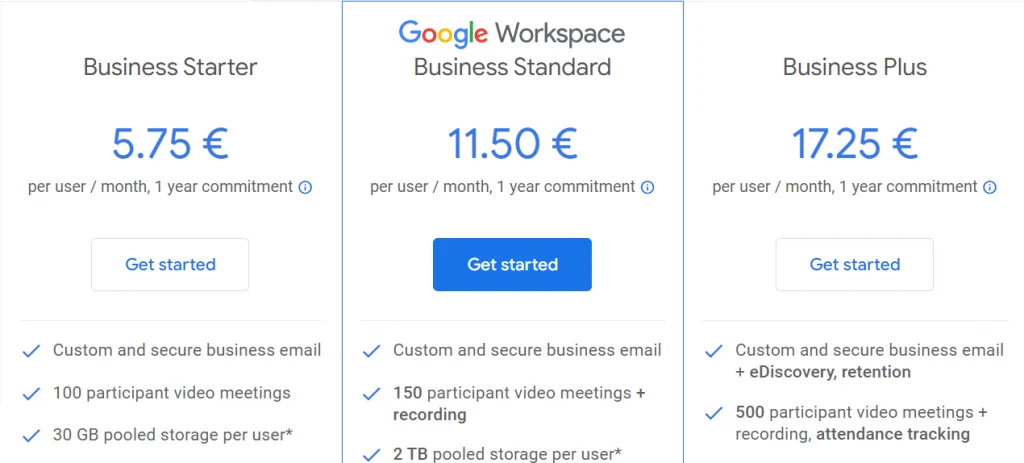
Google Workspace License Pricing for Businesses
Microsoft 365 or Google Workspace - Which to Choose?
Comparison of Packages:
Microsoft 365:
The first and most important issue is, of course, capacity and price. The pricing of both vendors is very similar. Microsoft offers 1 TB of cloud storage and 50 GB of email space in each Business package. Word, Excel, PowerPoint, Outlook, Teams, and OneDrive are a major advantage. You can access them via a web browser with any of the above subscriptions. Business Standard allows you to download them directly to PCs and Macs. This gives your team the tools to work efficiently and collaborate in real time.
Google Workspace:
Google offers shared file and email storage in its packages. The Business package offers twice the amount of space Microsoft provides at the same subscription level. Each Starter plan provides 30 GB of space for these two items – not much compared to the competition. In this case, it's worth considering the Business Standard subscription. You'll then receive up to 2 TB of storage, where your Google subscription entitles you to use Gmail, Google Drive, Chat, Docs, Sheets, and much more!
| Microsoft 365 | Google Workspace | |
| License Basic / Starter | 1 TB | 30 GB |
| License Standard | 1 TB | 2 TB |
| License Premium / Plus | 1 TB | 5 TB |
Comparison of cloud storage depending on your subscription
Google wins in terms of quantity versus price. Of course, upgrading your license doesn't just cover cloud storage capacity, but we'll address that in this article. Office Suite or modern Google apps? It all depends on your preferences.
Summary
I'll leave the choice between OneDrive and Google Drive to you. You can test both apps for free and choose your favorite. Without a doubt, cloud services are a solution that can transform our work for the better. Modern organizations need modern solutions.
We encourage you to explore the OFFER tab, where you'll find information about the Microsoft 365 suite. OneDrive is one of many applications offered by Microsoft and is a key communication tool for many companies. If you're considering implementing Office 365 Business in your company, contact us. Our specialists will guide you through the entire process efficiently and quickly.
The IT services and IT outsourcing provided by Support Online guarantee security and high quality. The technical support offered by our engineers is rated as top-notch by our customers.
Contact us by phone or email – CONTACT US.
Your IT.
our
support.
our
support.
Contact us
FAQ
What does an IT company do? What IT solutions do we use at Support Online?
When is it worth using an IT company?
Why is it worth hiring an IT company rather than a freelance IT specialist?
What are the advantages of working with IT Support Online?
What IT solutions do we use at Support Online?
When is it worth using an IT company?
Why is it worth hiring an IT company rather than a freelance IT specialist?
What are the advantages of working with IT Support Online?
What IT solutions do we use at Support Online?
When is it worth using an IT company?
Why is it worth hiring an IT company rather than a freelance IT specialist?
What are the advantages of working with IT Support Online?
An IT company, or IT firm, deals with information technology in a broad sense. This includes, among other things:
- Software design and development: An IT company can create custom applications for other companies or software products for the mass market. Depending on their specialization, these can include mobile applications, desktop applications, web applications, or embedded systems.
- Consulting services: An IT company often provides experts to advise on implementing new technologies, optimizing business processes, or selecting appropriate technological solutions.
- Cloud solutions: Many IT companies specialize in implementing and managing cloud solutions, such as data storage, application hosting, and data analysis platforms.
- IT security: Protection against cyberattacks, security audits, implementing security policies, and network monitoring are just some of the IT companies' responsibilities in this area.
- IT infrastructure management: In this area, a company may manage servers, databases, networks, and endpoints.
- Technical Support and Service: An IT company may provide support for its own products or general IT support for other companies, managing their technology on a daily basis.
- Training: Many IT providers also offer training in software use and secure technology use.
- Hardware Solutions: Some IT companies may also provide and configure computer, server, or network hardware.
Depending on their specialization and size, an IT company may offer one, several, or all of the above solutions. When choosing a provider, it's important to thoroughly understand their services and tailor them to your individual needs.
At Support Online, we have been supporting companies for years with
- comprehensive user support (both on-site and remotely),
- we service computers, phones, tablets, and related network issues,
- we specialize in server administration: Windows, Linux/Unix,
- we support virtualizers such as KVM, Hyper-V, VMWare, and Proxmox,
- we support cloud services, particularly solutions such as Azure, Microsoft 365, and AWS,
- we monitor servers and devices on the internet,
- we consult on development, DRP, and support the stability of your business in the IT layer.
If you're looking for a good IT company, Support Online is the right place to grow your business.
It's worth using an IT company like Support Online when:
- You plan to implement new technologies or software in your company.
- You need specialized technology consulting.
- You want to optimize existing IT processes.
- You struggle with digital security issues.
- You need support in managing your IT infrastructure.
- You lack internal resources or expertise to implement certain technology projects.
Using external IT experts can bring benefits in terms of saving time and resources, and ensuring high-quality solutions.
Hiring an IT company like Support Online offers several key benefits over an IT freelancer:
- Support from the entire team: An IT company has a full team of specialists, from DevOps specialists and Cyber Security Specialists to IT Helpdesk Specialists, who possess diverse skills and experience, enabling faster problem resolution and the implementation of more complex projects.
- Reliability and stability: IT companies have an established reputation and track record, which can translate into greater reliability and stability of services.
- Maintenance and support: An IT company can offer service contracts, warranties, and after-sales support, which may be more difficult to obtain from an individual freelancer.
- Resources: Companies have access to more resources, tools, and technologies that can accelerate and improve project execution.
- Long-term availability: The risk of a freelancer disappearing or changing careers is greater than the risk of a well-established company going out of business.
However, it's worth noting that the choice between a company and a freelancer depends on your specific needs and situation. If you value peace of mind and a quick response to unexpected problems, it is worth choosing an IT company such as Support Online.
Partnering with IT Support Online offers the following advantages:
- Professional IT outsourcing: The company guarantees high-quality IT outsourcing services for businesses of all sizes.
- Comprehensive IT support: IT Support Online provides comprehensive IT support that meets the diverse needs of businesses.
- Saves time and money: With our support, clients can focus on their core business activities while reducing the costs associated with information technology management.
- Serving a diverse range of businesses: The company specializes in serving both small and medium-sized enterprises and large corporations, demonstrating its flexibility and ability to adapt to diverse client needs.
- Leadership in IT outsourcing: The company is recognized as a leader in IT outsourcing, particularly in the Poznań and Warsaw regions.
By partnering with our company, IT Support Online, businesses can count on a high standard of service and professionalism at every stage of the relationship.


