Case study
migrations and backups
DRP, i.e. Disaster Recovery Plan and Environmental Recovery – Case study
Currently, servers are a fundamental part of the IT infrastructure in most enterprises and organizations. The reliability and availability of data, applications, and the machines they host play a key role in everyday business operations. Unpredictable failures of this infrastructure can cause disruptions in the smooth operation of the environment and other undesirable consequences, including financial and reputational damage. The most common...
The most popular solution to disaster recovery is the use of regular backups, which are discussed in detail in our blog article. These can be stored:
- Locally – on an external USB drive, magnetic tapes, or a NAS (Network Attached Storage) device, often including additional data loss protection in the form of a RAID array, which prevents data loss in the event of a disk failure.
- Online – data is stored on an external server – using the IaaS (Infrastructure as a Service) model, ensuring protection against local failures, and backups can be accessed independently of the company's internal network.
What is a Disaster Recovery Plan? When is it needed?
A Disaster Recovery Plan is a document containing procedures and guidelines for the efficient restoration of proper operation, including IT infrastructure, in the event of an unexpected failure. A Disaster Recovery Plan is a component of Business Continuity Planning, a strategy for ensuring the continuity of an organization's key processes.
A Disaster Recovery Plan is defined by, among other things, the following metrics:
- RPO (Recovery Point Objective) – specifies the acceptable amount of data loss. This is the time between the occurrence of a disaster and the last data backup. Assuming a company accepts an RPO of 3 hours, data backup or replication should occur at least every 3 hours.
- RTO (Recovery Time Objective) – specifies the maximum time to restore a backup, service, or environment after a disaster.
A DRP is important when the risk of data loss or loss of access to the IT infrastructure is assessed as high. Threats posing this risk include:
- Natural disasters – floods, fires, earthquakes.
- Technological threats – utility disruptions, hazardous material leaks, IT infrastructure failures.
- Human errors – data leaks or human-induced threats, such as cyberattacks.
Disaster Recovery – Case Study
In today's technological world, where companies and organizations increasingly rely on IT infrastructure, the ability to efficiently recover an environment after a disaster is essential for maintaining productivity and data security.
One of Support Online's clients is a company that has implemented a disaster recovery service. This service involves replicating key client machines located in a local server room to a geographically remote data center.
The case study described in this article describes the test process for recovering an environment after a controlled failure of the local IT infrastructure.
Environment Configuration – Key Elements for Recovery
A Support Online client's office is configured with two key virtual local area networks (VLANs): One is the DMZ (demilitarized zone) – a network area separated from the internal network, containing servers hosting websites, among other things, which are more susceptible to cyberattacks. This prevents attackers from accessing the local network. The second virtual network is the internal network, containing the remaining IT infrastructure. Both networks must be configured identically in the replicated environment to mirror the network configuration at the client's office.
Servers from the client's office are replicated to the Support Online servers at one-hour intervals, allowing the environment to be restored in a state consistent with the servers' state during replication in the event of a failure in the local server room.
Configuring a VPN connection is also crucial, allowing connection to the running backup environment. In this case, company employees connect remotely to the office via VPN using the FortiClient application. For testing purposes, we automatically distributed a second connection profile to all employees. This allows remote employees to easily connect to the backup environment and work on the servers running there.
The environment mentioned above, consisting of ten servers and the network configuration, will be crucial for us to recover from an unexpected failure.
The test described in this article simulates an event in which all servers in the office are damaged, for example, in the event of a fire in the server room.
Replicated servers view
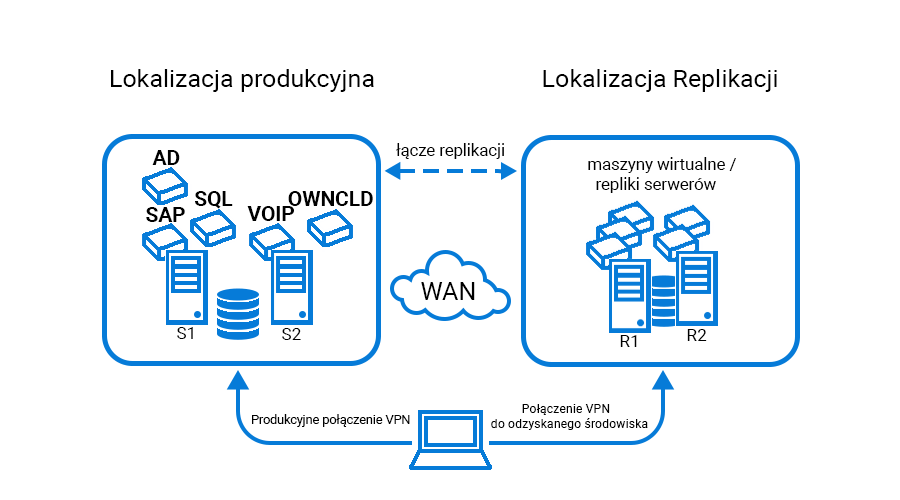
Environment Overview
Disaster Recovery Process
Receiving Information and Diagnosing the Failure
The first step before recovery is receiving information about an unexpected IT infrastructure failure. Online Support monitoring is the first to notify about any interruption in server operation or access, which is described in detail in a separate article on our blog. Our 24/7 engineers confirm the failure with the person responsible for authorizing such reports on the client's side. Once all persons involved in the procedures have been informed of the initiation of DRP and/or BCP procedures, we can begin the DR environment recovery procedure.
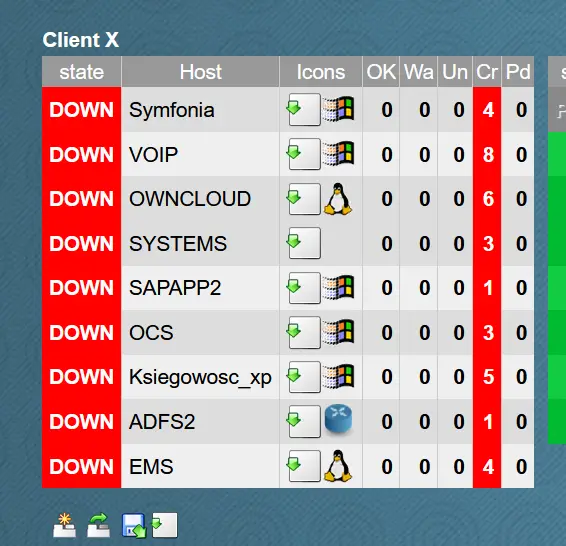
A view during a failure from the dashboard of the application monitoring client servers
Stopping Server Replication
Disabling or stopping replication in the backup software is the next step, which is important for a smooth, test recovery of the environment. This allows us to revert to the original state after the test.
Creating an Additional Machine Checkpoint
Creating an additional restore point is an additional option for securing the environment. If key data is deleted or lost in the recovered environment, it can be recovered by restoring the checkpoint.
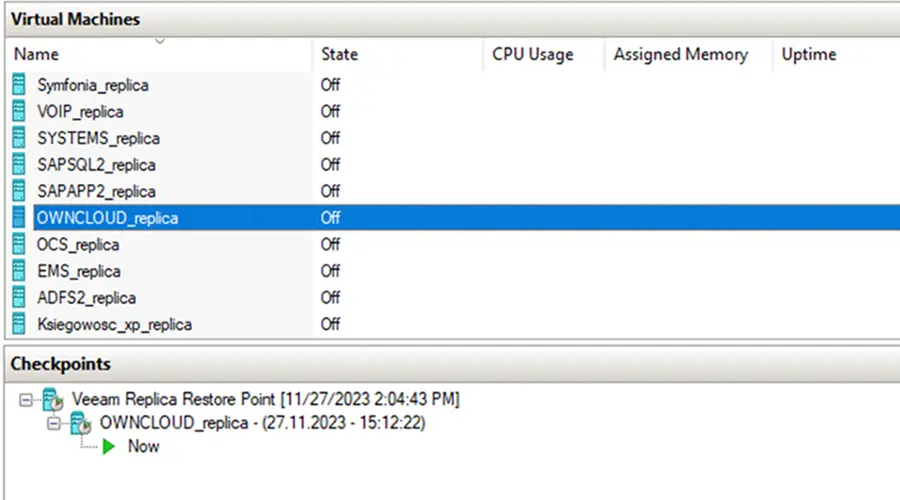
A new server restore point has been created in "Checkpoints."
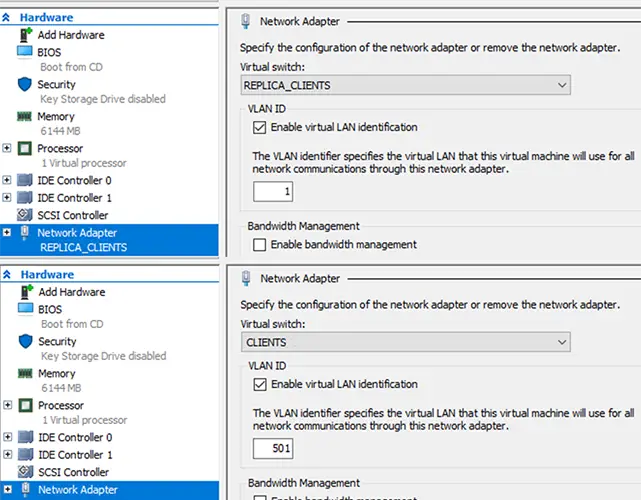
Changing Virtual Network Adapters
Network reconfiguration occurs after replication is disabled. All replicated servers within the Hyper-V virtualization software are assigned to the appropriate virtual local area network, and the machines' network adapters are changed to reflect the infrastructure environment at the company before the failure. This allows the machines to run on the appropriate and assigned VLANs, and services exposed to the world remain exposed as they were in the production environment (any changes must be made on the DNS server side, taking into account the new/different WAN addressing).
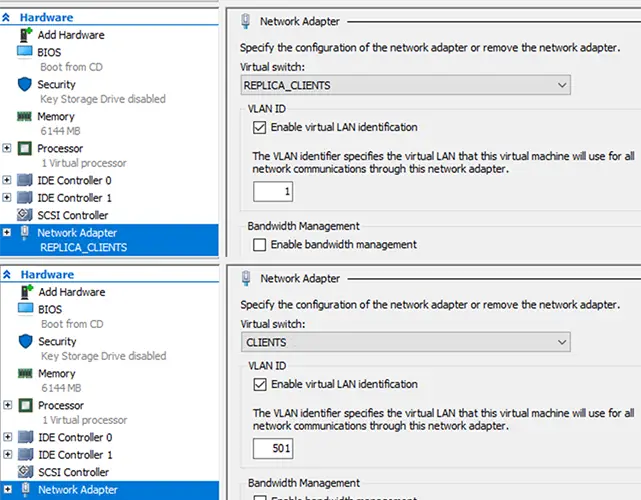
Above: Network adapter configured for replication.
Below: Changed network adapter and configured VLAN
Power-on Servers
Power-on machines and verification of proper operation are the next steps in environment recovery. This process verifies installed software, application communication functionality between servers, databases, and websites hosted on the servers.
When starting servers, the order in which machines are started is important. If one machine is acting as a DHCP server, it should be started first; otherwise, servers that should be assigned IP addresses may change their network configuration, requiring manual configuration.
Each employee can connect to the backup environment via the backup VPN profile on their computer and work on the shared resources there.
Informing about the Recovery of the Environment
The final step is to inform those participating in the DRP procedures about the recovery and verify the proper functioning of the environment. The DRP procedure test described above allowed the company to continue operations for 30 minutes after the failure in the local server room.
Summary:
DRP is a key element to consider when creating a Business Continuity Planning plan to maintain business continuity and minimize downtime following an unexpected disaster. To ensure the effectiveness of your disaster recovery plan, regular audits, tests, and procedure updates are essential.
Support Online has many years of experience implementing disaster recovery (DR) solutions. During this time, we have conducted dozens of tests in various environments and developed the best methods. Today, they allow us to implement similar projects for companies where security and business continuity are a priority.
Your IT.
our
support.
our
support.
Contact us
FAQ
What does an IT company do? What IT solutions do we use at Support Online?
When is it worth using an IT company?
Why is it worth hiring an IT company rather than a freelance IT specialist?
What are the advantages of working with IT Support Online?
What IT solutions do we use at Support Online?
When is it worth using an IT company?
Why is it worth hiring an IT company rather than a freelance IT specialist?
What are the advantages of working with IT Support Online?
What IT solutions do we use at Support Online?
When is it worth using an IT company?
Why is it worth hiring an IT company rather than a freelance IT specialist?
What are the advantages of working with IT Support Online?
An IT company, or IT firm, deals with information technology in a broad sense. This includes, among other things:
- Software design and development: An IT company can create custom applications for other companies or software products for the mass market. Depending on their specialization, these can include mobile applications, desktop applications, web applications, or embedded systems.
- Consulting services: An IT company often provides experts to advise on implementing new technologies, optimizing business processes, or selecting appropriate technological solutions.
- Cloud solutions: Many IT companies specialize in implementing and managing cloud solutions, such as data storage, application hosting, and data analysis platforms.
- IT security: Protection against cyberattacks, security audits, implementing security policies, and network monitoring are just some of the IT companies' responsibilities in this area.
- IT infrastructure management: In this area, a company may manage servers, databases, networks, and endpoints.
- Technical Support and Service: An IT company may provide support for its own products or general IT support for other companies, managing their technology on a daily basis.
- Training: Many IT providers also offer training in software use and secure technology use.
- Hardware Solutions: Some IT companies may also provide and configure computer, server, or network hardware.
Depending on their specialization and size, an IT company may offer one, several, or all of the above solutions. When choosing a provider, it's important to thoroughly understand their services and tailor them to your individual needs.
At Support Online, we have been supporting companies for years with
- comprehensive user support (both on-site and remotely),
- we service computers, phones, tablets, and related network issues,
- we specialize in server administration: Windows, Linux/Unix,
- we support virtualizers such as KVM, Hyper-V, VMWare, and Proxmox,
- we support cloud services, particularly solutions such as Azure, Microsoft 365, and AWS,
- we monitor servers and devices on the internet,
- we consult on development, DRP, and support the stability of your business in the IT layer.
If you're looking for a good IT company, Support Online is the right place to grow your business.
It's worth using an IT company like Support Online when:
- You plan to implement new technologies or software in your company.
- You need specialized technology consulting.
- You want to optimize existing IT processes.
- You struggle with digital security issues.
- You need support in managing your IT infrastructure.
- You lack internal resources or expertise to implement certain technology projects.
Using external IT experts can bring benefits in terms of saving time and resources, and ensuring high-quality solutions.
Hiring an IT company like Support Online offers several key benefits over an IT freelancer:
- Support from the entire team: An IT company has a full team of specialists, from DevOps specialists and Cyber Security Specialists to IT Helpdesk Specialists, who possess diverse skills and experience, enabling faster problem resolution and the implementation of more complex projects.
- Reliability and stability: IT companies have an established reputation and track record, which can translate into greater reliability and stability of services.
- Maintenance and support: An IT company can offer service contracts, warranties, and after-sales support, which may be more difficult to obtain from an individual freelancer.
- Resources: Companies have access to more resources, tools, and technologies that can accelerate and improve project execution.
- Long-term availability: The risk of a freelancer disappearing or changing careers is greater than the risk of a well-established company going out of business.
However, it's worth noting that the choice between a company and a freelancer depends on your specific needs and situation. If you value peace of mind and a quick response to unexpected problems, it is worth choosing an IT company such as Support Online.
Partnering with IT Support Online offers the following advantages:
- Professional IT outsourcing: The company guarantees high-quality IT outsourcing services for businesses of all sizes.
- Comprehensive IT support: IT Support Online provides comprehensive IT support that meets the diverse needs of businesses.
- Saves time and money: With our support, clients can focus on their core business activities while reducing the costs associated with information technology management.
- Serving a diverse range of businesses: The company specializes in serving both small and medium-sized enterprises and large corporations, demonstrating its flexibility and ability to adapt to diverse client needs.
- Leadership in IT outsourcing: The company is recognized as a leader in IT outsourcing, particularly in the Poznań and Warsaw regions.
By partnering with our company, IT Support Online, businesses can count on a high standard of service and professionalism at every stage of the relationship.


