Article
equipment and computers
Fixing Error 2003f on Apple Computers
Just a few years ago, Apple computers were a rarity in businesses. Those who opted for this alternative to Windows typically opted for the mythical maintenance-free nature and significantly fewer errors. Currently, a significant portion of companies specializing in graphics and multimedia choose MacBooks or iMacs because they perform significantly better in content creation.
Over time, like any operating system, your computer will slow down and need to be refreshed. Reinstalling the system is also necessary if you change employees. Several solutions provided by the manufacturer can be used, and the best one is undoubtedly "Internet recovery."
This is simply reinstalling macOS, which is downloaded directly from the internet to your computer and then immediately installed on a drive of your choice. In 99% of cases, this process is hands-free. This article will explain the 1% of cases where a factory reset fails due to error -2003f.
What causes error -2003f?
Simply put, this error prevents your computer from downloading or installing the operating system. Worse still, even if you try to restore your computer to factory settings using a USB drive, you'll still receive the same error. The cause isn't a connection issue or a slow flash drive, but rather a corrupted firmware (the equivalent of the BIOS in Windows machines) that doesn't accept the new installation. Below, we'll describe the entire process of resetting the firmware on Mac computers, making your computer as good as new again.
System Restore Process
What You'll Need?
- Damaged Computer
- A second, working computer running macOS with internet access
- A USB-C to USB-C or USB-C to USB-A cable, depending on the type of USB port on your MacBook
There's also a way to restore your system using a USB drive, and this option requires a working computer running macOS with internet access. To download the installer, simply launch the App Store and enter the version of the operating system your MacBook originally came with. For example, Mojave, which is version 14 of the operating system. Install the downloaded system package on a flash drive using the Terminal command:
sudo /Applications/Install\ macOS\ Mojave.app/Contents/Resources/createinstallmedia --volume /Volumes/MyVolume
Simply launch Terminal using Spotlight or directly from Launchpad, from the "other" folder. After entering any commands starting with "sudo," you must enter your current password to log in to the system.
Replace "MyVolume" with the name of the USB drive connected to your MacBook. Once the operation is complete, simply restart the system and, depending on the processor installed in your computer, start it as follows:
- Apple processors (computers from 2020):
Press and hold the power button until you see a list of volumes. Then select the previously prepared drive and follow the instructions.
- Intel processors (computers before 2020):
Hold down the Option ⌥ key until you see the list of volumes, release the button, select the previously prepared disk, and follow the instructions.
This option may also not work if the firmware is corrupted. Fortunately, Apple computers, like Apple phones, have a DFU (Device Firmware Upgrade) mode, which allows you to reinstall corrupted firmware.
The firmware update must be performed using two computers. On the working MacBook, install Apple Configurator 2 from the App Store and run it. Then, connect the faulty and working laptops using the appropriate USB cable.
On the faulty computer, press the power button and, while holding it down, press the right Shift, left Option, and left Control keys for approximately 10 seconds. If you hold them down too briefly or too long, the computer will not enter DFU mode, which is our goal. On the working MacBook, Apple Configurator 2 should display "DFU." If this happens, you're very close to success.
Then right-click on the DFU text and select:
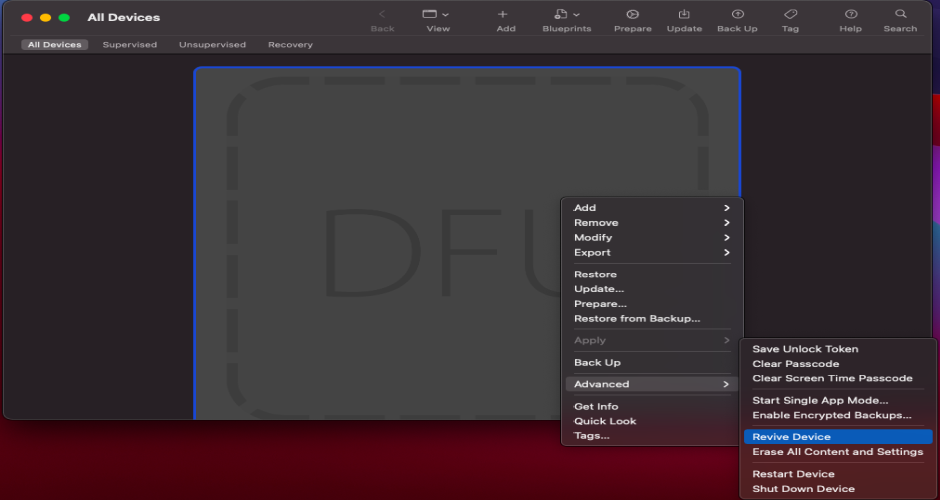
After restarting your "damaged" MacBook, you can now check if Internet Recovery will work. If not, the only remaining option is to reinstall the factory software (also known as firmware) using the "Restore" option:
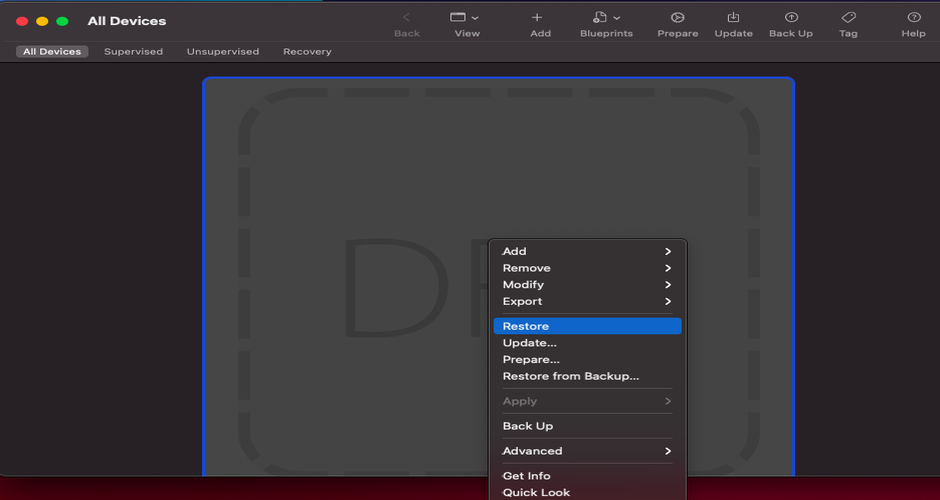
After confirming that you agree to reinstall the firmware and erase all data from the drive, your computer will restart several times. There's a very good chance you've just fixed the 2003f error on your MacBook and can reinstall the operating system.
To prevent data loss during the above process, it's best to use Time Machine backups, e.g., to a network drive, or to store your documents in iCloud.
For over 20 years, Support Online has been offering its clients top-tier IT outsourcing. Our experience, knowledge, and know-how have allowed us to develop appropriate methods and practices to provide IT services to companies worldwide. We encourage you to explore our offerings:
- server administration
- help desk
- cloud data backup
and much more...
Have any questions? Contact us!
Your IT.
our
support.
our
support.
Contact us
FAQ
What does an IT company do? What IT solutions do we use at Support Online?
When is it worth using an IT company?
Why is it worth hiring an IT company rather than a freelance IT specialist?
What are the advantages of working with IT Support Online?
What IT solutions do we use at Support Online?
When is it worth using an IT company?
Why is it worth hiring an IT company rather than a freelance IT specialist?
What are the advantages of working with IT Support Online?
What IT solutions do we use at Support Online?
When is it worth using an IT company?
Why is it worth hiring an IT company rather than a freelance IT specialist?
What are the advantages of working with IT Support Online?
An IT company, or IT firm, deals with information technology in a broad sense. This includes, among other things:
- Software design and development: An IT company can create custom applications for other companies or software products for the mass market. Depending on their specialization, these can include mobile applications, desktop applications, web applications, or embedded systems.
- Consulting services: An IT company often provides experts to advise on implementing new technologies, optimizing business processes, or selecting appropriate technological solutions.
- Cloud solutions: Many IT companies specialize in implementing and managing cloud solutions, such as data storage, application hosting, and data analysis platforms.
- IT security: Protection against cyberattacks, security audits, implementing security policies, and network monitoring are just some of the IT companies' responsibilities in this area.
- IT infrastructure management: In this area, a company may manage servers, databases, networks, and endpoints.
- Technical Support and Service: An IT company may provide support for its own products or general IT support for other companies, managing their technology on a daily basis.
- Training: Many IT providers also offer training in software use and secure technology use.
- Hardware Solutions: Some IT companies may also provide and configure computer, server, or network hardware.
Depending on their specialization and size, an IT company may offer one, several, or all of the above solutions. When choosing a provider, it's important to thoroughly understand their services and tailor them to your individual needs.
At Support Online, we have been supporting companies for years with
- comprehensive user support (both on-site and remotely),
- we service computers, phones, tablets, and related network issues,
- we specialize in server administration: Windows, Linux/Unix,
- we support virtualizers such as KVM, Hyper-V, VMWare, and Proxmox,
- we support cloud services, particularly solutions such as Azure, Microsoft 365, and AWS,
- we monitor servers and devices on the internet,
- we consult on development, DRP, and support the stability of your business in the IT layer.
If you're looking for a good IT company, Support Online is the right place to grow your business.
It's worth using an IT company like Support Online when:
- You plan to implement new technologies or software in your company.
- You need specialized technology consulting.
- You want to optimize existing IT processes.
- You struggle with digital security issues.
- You need support in managing your IT infrastructure.
- You lack internal resources or expertise to implement certain technology projects.
Using external IT experts can bring benefits in terms of saving time and resources, and ensuring high-quality solutions.
Hiring an IT company like Support Online offers several key benefits over an IT freelancer:
- Support from the entire team: An IT company has a full team of specialists, from DevOps specialists and Cyber Security Specialists to IT Helpdesk Specialists, who possess diverse skills and experience, enabling faster problem resolution and the implementation of more complex projects.
- Reliability and stability: IT companies have an established reputation and track record, which can translate into greater reliability and stability of services.
- Maintenance and support: An IT company can offer service contracts, warranties, and after-sales support, which may be more difficult to obtain from an individual freelancer.
- Resources: Companies have access to more resources, tools, and technologies that can accelerate and improve project execution.
- Long-term availability: The risk of a freelancer disappearing or changing careers is greater than the risk of a well-established company going out of business.
However, it's worth noting that the choice between a company and a freelancer depends on your specific needs and situation. If you value peace of mind and a quick response to unexpected problems, it is worth choosing an IT company such as Support Online.
Partnering with IT Support Online offers the following advantages:
- Professional IT outsourcing: The company guarantees high-quality IT outsourcing services for businesses of all sizes.
- Comprehensive IT support: IT Support Online provides comprehensive IT support that meets the diverse needs of businesses.
- Saves time and money: With our support, clients can focus on their core business activities while reducing the costs associated with information technology management.
- Serving a diverse range of businesses: The company specializes in serving both small and medium-sized enterprises and large corporations, demonstrating its flexibility and ability to adapt to diverse client needs.
- Leadership in IT outsourcing: The company is recognized as a leader in IT outsourcing, particularly in the Poznań and Warsaw regions.
By partnering with our company, IT Support Online, businesses can count on a high standard of service and professionalism at every stage of the relationship.


