Article
VPN and remote work
DNS – Czym jest? Jakie ma zadania?
Podstawowym zadaniem systemu DNS (ang. Domain Name System) jest tłumaczenie nazw domen, wykorzystywanych na co dzień przez użytkowników Internetu, na odpowiadające im adresy IP zrozumiałe dla urządzeń działających w sieci. Po wpisaniu w przeglądarce adresu www.support-online.pl wysłane zostanie zapytanie do serwera DNS, a następnie połączymy się z komputerem o adresie IP 81.210.86.82.
Struktura systemu DNS
Serwery DNS tworzą drzewiastą strukturę hierarchiczną (Rysunek 1). Na jej szczycie znajduje się strefa root „.”, z której wydelegowano domeny najwyższego poziomu (ang. Top Level Domains, TLD). Są one obsługiwane przez 13 głównych serwerów nazywanych root servers, które skopiowano i rozmieszczono w różnych częściach świata. Domeny TLD podzielić możemy na dwa typy:
- funkcjonalne (ang. generic TLD, gTLD) – np. .com, .org, .net, .gov, .edu,
- krajowe (ang. country code TLD, ccTLD) – np. .de, .pl, .uk, .us.
Niżej w hierarchii znajdują się domeny drugiego poziomu (ang. Second Level Domains). Mogą to być domeny funkcjonalne (np. .com.pl, .gov.pl), regionalne (np. krakow.pl, waw.pl), a także należące do firm lub osób prywatnych (np. onet.pl). Domeny SLD są subdomenami TLD. Każdy właściciel domeny może tworzyć w niej kolejne poziomy subdomen. Za tworzenie i zarządzanie domenami najwyższego poziomu odpowiadają organizacje IANA (ang. Internet Assigned Numbers Authority) oraz ICANN (ang. The Internet Corporation for Assigned Names and Numbers). Rejestr polskiej domeny krajowej .pl prowadzi NASK – Naukowa i Akademicka Sieć Komputerowa.
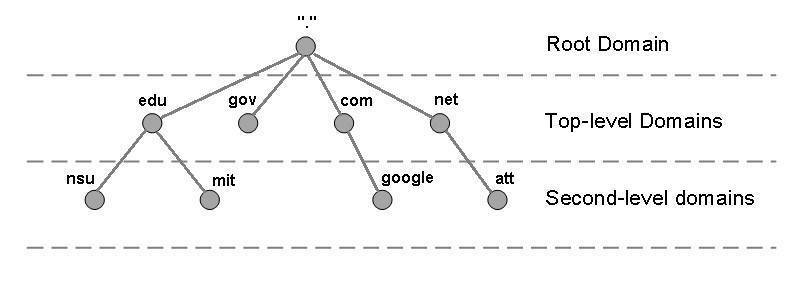
Rysunek 1. Struktura systemu DNS
Odpytywanie serwerów DNS
Każdy komputer wykorzystujący system DNS musi znać adres przynajmniej jednego rekursywnego serwera DNS. Są one zazwyczaj udostępniane przez lokalnych dostawców Internetu. Zadaniem serwera rekursywnego jest uzyskanie adresu IP komputera powiązanego z daną domeną lub zwrócenie komunikatu o błędzie, jeżeli takiego adresu nie uda się ustalić (np. wybrana domena nie istnieje). Serwer rekursywny odpytuje zgodnie z hierarchią serwery autorytatywne kolejnych stref, aż do uzyskania ostatecznego adresu hosta żądanego przez użytkownika. Otrzymywane adresy zapisywane są w pamięci podręcznej (ang. cache). Kolejne zapytanie o tą samą domenę spowoduje, że serwer rekursywny zwróci odpowiedź bezpośrednio z cache.
Serwery autorytatywne to serwery utrzymujące domeny. Odpowiadają na zapytania dotyczące domen znajdujących się w strefie zarządzanej przez dany serwer. Zwracana odpowiedź charakteryzuje się ustawionym bitem uwierzytelniania AA (ang. Authoritative Answer).
Kolejność odpytywania serwerów DNS przedstawia Rysunek 2.
ze rozwiązanie.
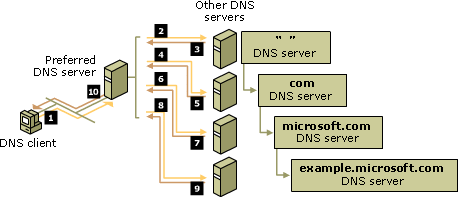
Rysunek 2 Odpytywanie serwerów DNS
Nazewnictwo domen
Nazwy domen to etykiety tekstowe poszczególnych węzłów drzewa o długości od 1 do 63 znaków. Mogą zawierać dowolne cyfry, litery oraz znak „-„. Istnieje również możliwość wykorzystania znaków narodowych w nazwie domeny np. „ą”, „ę”, „ż” itd. Czytając etykiety węzłów od węzła do korzenia i oddzielając je kropkami otrzymujemy pełną nazwę domenową np. mail.google.com.
Rekordy domeny
Domeny w systemie DNS opisane są za pomocą rekordów, które określają pełną konfigurację danej domeny. Każdy z rekordów składa się z nazwy, wartości (w zależności od typu rekordu może to być np. adres IP, URL lub wpis tekstowy), typu (informuje o tym, który parametr domeny jest konfigurowany) oraz parametru TTL (ang. Time to Live, okres przechowywania rekordu przez serwery DNS wyrażony w sekundach). Najważniejsze rekordy w systemie DNS to:
- rekord A (Address) – mapuje nazwę domeny na adres IPv4 serwera,
- rekord AAAA (IPv6 Address) – mapuje nazwę domeny na adres IPv6 serwera,
- rekord CNAME (Canonical Name) – ustawia alias dla domeny,
- rekord NS (Name Server) – wskazuje serwery nazw zawierające konfigurację DNS danej domeny, każda domena powinna mieć co najmniej dwa rekordy NS,
- rekord MX (Mail eXchange) – określa serwer przeznaczony do obsługi poczty w danej domenie, istnieje możliwość stworzenia wielu rekordów MX w obrębie jednej domeny i przypisania im priorytetów (poczta przekazywana będzie do serwera o najwyższym priorytecie, a w przypadku jego awarii, zostanie przekazana do kolejnego serwera),
- rekord SOA (Start Of Authority) – zawiera informacje dotyczące domeny – jej nazwę, adres e-mail administratora, adresy serwerów autorytatywnych,
- rekord TXT (Text record) – rekord tekstowy, może być wykorzystany np. do autoryzacji wysyłki poczty elektronicznej w danej domenie (mechanizm Sender Policy Framework).
Rekordy dla dowolnej domeny możemy odczytać np. za pomocą polecenia nslookup w systemie Windows, dig w systemie Linux lub z wykorzystaniem aplikacji dostępnych online (np. https://www.whois.com.au/whois/dns.html). Rekordy DNS dla domeny so.com.pl prezentuje Rysunek 3.
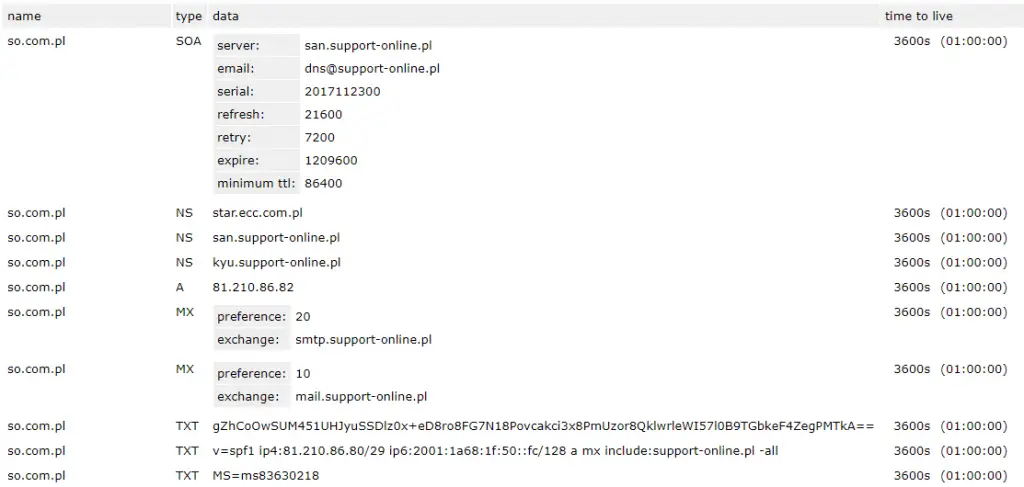
Rysunek 3 Rekordy DNS dla domeny so.com.pl
DNS w praktyce – przykład
Użytkownik chce odwiedzić stronę support-online.pl. Proces rozpoznawania adresu IP dla tej domeny przebiega następująco:
| Wysyła | Odbiera | Opis |
| Przeglądarka | Serwer DNS providera 8.8.4.4 | Przeglądarka wysyła zapytanie do znanego serwera DNS. Może to być np. serwer 8.8.4.4 udostępniany przez Google. |
| Serwer DNS providera 8.8.4.4 | Root serwer DNS 192.5.5.241 | Serwer providera odpytuje jeden z głównych serwerów DNS o adres support-online.pl |
| Root serwer DNS 192.5.5.241 | Serwer DNS providera 8.8.4.4 | Główny serwer DNS zwraca adres serwera obsługującego domenę .pl – 156.154.100.15 |
| Serwer DNS providera 8.8.4.4 | Serwer DNS domeny .pl 156.154.100.15 | Serwer providera odpytuje serwer domeny .pl o adres support-online.pl |
| Serwer DNS domeny .pl 156.154.100.15 | Serwer DNS providera 8.8.4.4 | Serwer DNS domeny .pl zna adres IP domeny support-online.pl i zwraca odpowiedź: 81.210.86.82 |
| Serwer DNS providera 8.8.4.4 | Przeglądarka Ustalony adres IP 81.210.86.82 | Udało się ustalić adres IP serwera support-online.pl. Serwer DNS odpowiada przeglądarce. |
| Przeglądarka | Serwer support-online.pl 81.210.86.82 | Przeglądarka łączy się z ustalonym adresem IP i pobiera stronę. |
Podsumowanie
Korzystając na co dzień z Internetu odwiedzamy wiele różnych portali. Czytelne, zrozumiałe nazwy domen są bardzo łatwe do zapamiętania i przyjazne użytkownikom. Do komunikacji pomiędzy urządzeniami działającymi w sieci wymagana jest jednak znajomość adresów IP. Odwzorowywanie nazw domen na adresy IP przyporządkowanych im komputerów możliwe jest dzięki zastosowaniu systemu DNS.
Support Online świadczy outsourcing IT dla ponad 200 klientów na całym świecie. Oferujemy usługi informatyczne dla małych, średnich i dużych firm. Wsparcie IT daje wiele możliwości, dlatego zachęcamy do zapoznania się z naszą OFERTĄ: administracja serwerami, helpdesk, usługi chmurowe i wiele innych.
Skontaktuj się z nami - TUTAJ a my znajdziemy dla Ciebie najleps
Your IT.
our
support.
our
support.
Contact us
FAQ
What does an IT company do? What IT solutions do we use at Support Online?
When is it worth using an IT company?
Why is it worth hiring an IT company rather than a freelance IT specialist?
What are the advantages of working with IT Support Online?
What IT solutions do we use at Support Online?
When is it worth using an IT company?
Why is it worth hiring an IT company rather than a freelance IT specialist?
What are the advantages of working with IT Support Online?
What IT solutions do we use at Support Online?
When is it worth using an IT company?
Why is it worth hiring an IT company rather than a freelance IT specialist?
What are the advantages of working with IT Support Online?
An IT company, or IT firm, deals with information technology in a broad sense. This includes, among other things:
- Software design and development: An IT company can create custom applications for other companies or software products for the mass market. Depending on their specialization, these can include mobile applications, desktop applications, web applications, or embedded systems.
- Consulting services: An IT company often provides experts to advise on implementing new technologies, optimizing business processes, or selecting appropriate technological solutions.
- Cloud solutions: Many IT companies specialize in implementing and managing cloud solutions, such as data storage, application hosting, and data analysis platforms.
- IT security: Protection against cyberattacks, security audits, implementing security policies, and network monitoring are just some of the IT companies' responsibilities in this area.
- IT infrastructure management: In this area, a company may manage servers, databases, networks, and endpoints.
- Technical Support and Service: An IT company may provide support for its own products or general IT support for other companies, managing their technology on a daily basis.
- Training: Many IT providers also offer training in software use and secure technology use.
- Hardware Solutions: Some IT companies may also provide and configure computer, server, or network hardware.
Depending on their specialization and size, an IT company may offer one, several, or all of the above solutions. When choosing a provider, it's important to thoroughly understand their services and tailor them to your individual needs.
At Support Online, we have been supporting companies for years with
- comprehensive user support (both on-site and remotely),
- we service computers, phones, tablets, and related network issues,
- we specialize in server administration: Windows, Linux/Unix,
- we support virtualizers such as KVM, Hyper-V, VMWare, and Proxmox,
- we support cloud services, particularly solutions such as Azure, Microsoft 365, and AWS,
- we monitor servers and devices on the internet,
- we consult on development, DRP, and support the stability of your business in the IT layer.
If you're looking for a good IT company, Support Online is the right place to grow your business.
It's worth using an IT company like Support Online when:
- You plan to implement new technologies or software in your company.
- You need specialized technology consulting.
- You want to optimize existing IT processes.
- You struggle with digital security issues.
- You need support in managing your IT infrastructure.
- You lack internal resources or expertise to implement certain technology projects.
Using external IT experts can bring benefits in terms of saving time and resources, and ensuring high-quality solutions.
Hiring an IT company like Support Online offers several key benefits over an IT freelancer:
- Support from the entire team: An IT company has a full team of specialists, from DevOps specialists and Cyber Security Specialists to IT Helpdesk Specialists, who possess diverse skills and experience, enabling faster problem resolution and the implementation of more complex projects.
- Reliability and stability: IT companies have an established reputation and track record, which can translate into greater reliability and stability of services.
- Maintenance and support: An IT company can offer service contracts, warranties, and after-sales support, which may be more difficult to obtain from an individual freelancer.
- Resources: Companies have access to more resources, tools, and technologies that can accelerate and improve project execution.
- Long-term availability: The risk of a freelancer disappearing or changing careers is greater than the risk of a well-established company going out of business.
However, it's worth noting that the choice between a company and a freelancer depends on your specific needs and situation. If you value peace of mind and a quick response to unexpected problems, it is worth choosing an IT company such as Support Online.
Partnering with IT Support Online offers the following advantages:
- Professional IT outsourcing: The company guarantees high-quality IT outsourcing services for businesses of all sizes.
- Comprehensive IT support: IT Support Online provides comprehensive IT support that meets the diverse needs of businesses.
- Saves time and money: With our support, clients can focus on their core business activities while reducing the costs associated with information technology management.
- Serving a diverse range of businesses: The company specializes in serving both small and medium-sized enterprises and large corporations, demonstrating its flexibility and ability to adapt to diverse client needs.
- Leadership in IT outsourcing: The company is recognized as a leader in IT outsourcing, particularly in the Poznań and Warsaw regions.
By partnering with our company, IT Support Online, businesses can count on a high standard of service and professionalism at every stage of the relationship.


