Article
IT security and cybersecurity
LOG4SHELL – How to defend yourself against an attack
The Log4j library has a critical vulnerability called Log4Shell, which was disclosed on December 9, 2021. The vulnerability allows for remote code execution (REMOTECODE) and was officially marked CVE-2021-44228 as critical (and after its patch, CVE-2021-45046 and CVE-2021-45105 (DoS). Cybersecurity experts say this is the biggest vulnerability in decades.
Log4j is a library commonly used in services and applications for event logging. The vulnerability affects library versions 2.0 to 2.14.1 (CVE-2021-44228), 2.15.0 (CVE-2021-45046), and 2.16.0 (CVE-2021-45105). It also affects all services and systems using the Java Virtual Machine (JVM).
The JNDI (Java Naming and Directory Interface) interface to the Naming and Directory services provides the ability to find objects based on their names ("lookup," "search," and "directory objects"). Directory objects differ from general objects in that attributes can be associated with objects.
The directory service therefore offers extended functionality for manipulating object attributes. Exploitation of the vulnerability requires that user-controllable event logging be enabled. This logging allows an attacker to remotely execute code.
The JNDI weakness has been known since 2016, when the concept of exploiting this vulnerability was presented at the "Black Hat 2016" conference.

An attacker who controls logs or event log parameters can remotely execute code by loading them from an LDAP server. The message search override option must be enabled. This option was disabled by default in version 2.15.0, but additional methods have been found. Currently, library version 2.17.1 is considered secure.
How can a potentially benign log be manipulated to exploit your system? Below are two lines of Java code: the first: creating an object that will be used for logging (Log4j), and the second: an error that will be passed from the browser to the system, along with the "id" parameter from the user.

The attacker replaces the parameter in the query to the system:

for example this (for CVE-2021-44228):

The key elements are the dollar sign and the curly brace. Inside the brace, you can see JNDI and an attempt to connect via LDAP to a pre-configured server containing malware that will be executed server-side as a Java program.
In the next library version 2.15.0 (for CVE-2021-45046):

Version 2.15.0 of Log4j will display the request as valid because localhost is present before the "#." However, the framework will still resolve the entire string and attempt to contact the server via an LDAP query.
In the next library version 2.16.0 (CVE-2021-45105):

The above query is more complex to execute due to knowledge and control over the search commands. This vulnerability has infinite recursion, so a successful exploit would result in a Denial of Service (DoS) attack. The log can be created so that, when executed, it triggers an infinite loop condition, creating a Denial of Service by exhausting resources.
If you're wondering what steps you should take to secure your environment, you'll find some useful information below.
Log4Shell: A Way to Protect Yourself
First, you should take corrective action by updating the library and working with the vendor of the software you're using. The next step is to check the firewall's status. Currently, hardware firewalls available on the market include NGFW (Next Generation Firewall) and software WAF (Web Application Firewall).
Fortinet: A Security Leader
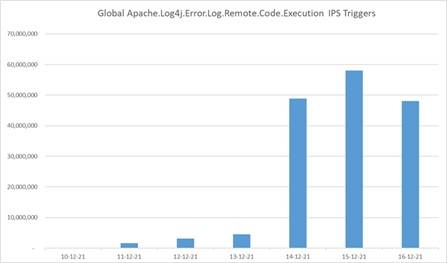
One of the market leaders is Fortinet, which provides its devices with daily updates and the latest security features. Thanks to tools like the Intrusion Prevention System (IPS), the FortiGate NGFW appliance can detect and block known code based on signatures/vaccines. Below is a bar graph presented by FortiGuard (Fortinet's cybersecurity research group) after a vulnerability was detected and implemented into the IPS.
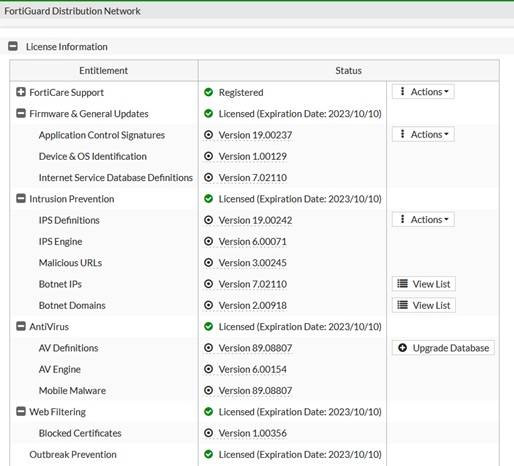
If you have a FortiGate, you can easily check whether your IPS has updated its database to the latest version or force a manual update using the following commands:
fortigate # diagnose autoupdate status
fortigate # diagnose autoupdate versions
fortigate # execute update-now
fortigate # get webfilter status
fortigate # diagnose debug rating
You can also check this using the graphical user interface (GUI): System->FortiGuard:
FortiOS Software - Protection against Log2Shell Attacks
The manufacturer assures that the FortiOS software used in FortiGate/FortiWiFi devices is not vulnerable to Log2Shell attacks. FortiGuard has introduced IPS signatures for Log4j with VID 51006. The signatures were released in version 19.215 of the IPS Definitions. The image above shows version 19.242. Below, you can see what the signatures look like in the IPS database:
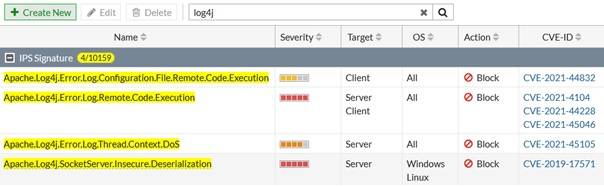
It's worth mentioning that FortiOS allows you to define your own signatures, which you can use to filter traffic flowing through the device after implementing an IPS. You can also inspect SSL-encrypted traffic using SSL inspection implemented with the same firewall rules.
Implementing an NGFW can help secure the Log4J library.
If you don't fully understand where the vulnerable Log4J library is being used, consider implementing an NGFW. It will help identify attacks and effectively block them.
Log4Shell Protection with Online Support
If you'd like to have more time to develop your business and stop worrying about issues like LOG4SHELL, consider using our Online Support service. As part of our IT support, we ensure IT security, including the remediation described in this article.
We specialize in full IT outsourcing, but our IT services also include cybersecurity training and dedicated server administration. If you'd like to learn more about your company's current security posture, we invite you to explore our IT audit offer. We've been operating since 2002 and serve over 200 clients. Please contact us by phone or email.
Your IT.
our
support.
our
support.
Contact us
FAQ
What does an IT company do? What IT solutions do we use at Support Online?
When is it worth using an IT company?
Why is it worth hiring an IT company rather than a freelance IT specialist?
What are the advantages of working with IT Support Online?
What IT solutions do we use at Support Online?
When is it worth using an IT company?
Why is it worth hiring an IT company rather than a freelance IT specialist?
What are the advantages of working with IT Support Online?
What IT solutions do we use at Support Online?
When is it worth using an IT company?
Why is it worth hiring an IT company rather than a freelance IT specialist?
What are the advantages of working with IT Support Online?
An IT company, or IT firm, deals with information technology in a broad sense. This includes, among other things:
- Software design and development: An IT company can create custom applications for other companies or software products for the mass market. Depending on their specialization, these can include mobile applications, desktop applications, web applications, or embedded systems.
- Consulting services: An IT company often provides experts to advise on implementing new technologies, optimizing business processes, or selecting appropriate technological solutions.
- Cloud solutions: Many IT companies specialize in implementing and managing cloud solutions, such as data storage, application hosting, and data analysis platforms.
- IT security: Protection against cyberattacks, security audits, implementing security policies, and network monitoring are just some of the IT companies' responsibilities in this area.
- IT infrastructure management: In this area, a company may manage servers, databases, networks, and endpoints.
- Technical Support and Service: An IT company may provide support for its own products or general IT support for other companies, managing their technology on a daily basis.
- Training: Many IT providers also offer training in software use and secure technology use.
- Hardware Solutions: Some IT companies may also provide and configure computer, server, or network hardware.
Depending on their specialization and size, an IT company may offer one, several, or all of the above solutions. When choosing a provider, it's important to thoroughly understand their services and tailor them to your individual needs.
At Support Online, we have been supporting companies for years with
- comprehensive user support (both on-site and remotely),
- we service computers, phones, tablets, and related network issues,
- we specialize in server administration: Windows, Linux/Unix,
- we support virtualizers such as KVM, Hyper-V, VMWare, and Proxmox,
- we support cloud services, particularly solutions such as Azure, Microsoft 365, and AWS,
- we monitor servers and devices on the internet,
- we consult on development, DRP, and support the stability of your business in the IT layer.
If you're looking for a good IT company, Support Online is the right place to grow your business.
It's worth using an IT company like Support Online when:
- You plan to implement new technologies or software in your company.
- You need specialized technology consulting.
- You want to optimize existing IT processes.
- You struggle with digital security issues.
- You need support in managing your IT infrastructure.
- You lack internal resources or expertise to implement certain technology projects.
Using external IT experts can bring benefits in terms of saving time and resources, and ensuring high-quality solutions.
Hiring an IT company like Support Online offers several key benefits over an IT freelancer:
- Support from the entire team: An IT company has a full team of specialists, from DevOps specialists and Cyber Security Specialists to IT Helpdesk Specialists, who possess diverse skills and experience, enabling faster problem resolution and the implementation of more complex projects.
- Reliability and stability: IT companies have an established reputation and track record, which can translate into greater reliability and stability of services.
- Maintenance and support: An IT company can offer service contracts, warranties, and after-sales support, which may be more difficult to obtain from an individual freelancer.
- Resources: Companies have access to more resources, tools, and technologies that can accelerate and improve project execution.
- Long-term availability: The risk of a freelancer disappearing or changing careers is greater than the risk of a well-established company going out of business.
However, it's worth noting that the choice between a company and a freelancer depends on your specific needs and situation. If you value peace of mind and a quick response to unexpected problems, it is worth choosing an IT company such as Support Online.
Partnering with IT Support Online offers the following advantages:
- Professional IT outsourcing: The company guarantees high-quality IT outsourcing services for businesses of all sizes.
- Comprehensive IT support: IT Support Online provides comprehensive IT support that meets the diverse needs of businesses.
- Saves time and money: With our support, clients can focus on their core business activities while reducing the costs associated with information technology management.
- Serving a diverse range of businesses: The company specializes in serving both small and medium-sized enterprises and large corporations, demonstrating its flexibility and ability to adapt to diverse client needs.
- Leadership in IT outsourcing: The company is recognized as a leader in IT outsourcing, particularly in the Poznań and Warsaw regions.
By partnering with our company, IT Support Online, businesses can count on a high standard of service and professionalism at every stage of the relationship.


