Article
VPN and remote work
How to Choose the Best VPN Service? Types of VPNs and Their Uses for Business and Personal Use
What is a VPN and what is it used for? The growing popularity of remote work has also led to a surge in interest in services that enhance security and facilitate access to company resources outside the office or corporate headquarters. One of these is, of course, a VPN, or Virtual Private Network. The business services market offers a range of such solutions, including...
What is a VPN and what is it used for?
The growing popularity of remote work has also led to a surge in interest in services that enhance security and facilitate access to company resources from outside the office or corporate headquarters. One of these is, of course, a VPN, or Virtual Private Network. The business services market offers a number of such solutions, including products from companies such as Fortinet, Cisco, CheckPoint, and PaloAlto. Simply put, they involve encrypting all network traffic between an employee's computer and the company's IT infrastructure. Implementing such a solution, however, is quite expensive and requires the assistance of IT specialists or an in-house IT support department.
For this reason, commercial solutions aimed at home users, such as ProtonVPN, NordVPN, ExpressVPN, and PrivateInternetAccess, are also very popular. They operate in a similar manner, are simpler to configure, but have slightly different assumptions. While the former requires a device located in the company or company server room to operate the VPN, here all you need is a program downloaded from the internet – a client – that provides connection to the service provider's network, through which the user's network traffic is transmitted. Configuration takes literally minutes, and installation is no different than any other program.
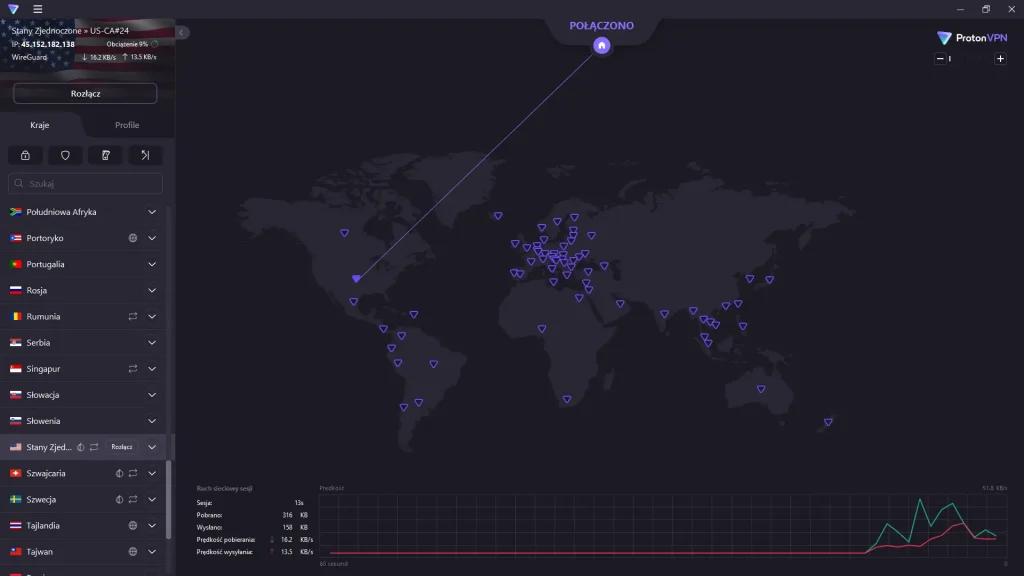
Figure 1 - ProtonVPN app appearance
What are the differences between commercial and business services?
The primary difference between the two solutions is their application. As mentioned in the first paragraph, business-specific solutions primarily offer the ability to securely connect to the corporate network. They provide encrypted connectivity to corporate resources, which increases security, and enable remote access to shared computers, terminals, network drives, and servers, among other things, without having to be in the office. In simple terms, it looks like the image below:

Figure 2 - Corporate network connection diagram using Fortigate as an example
Advantages include high configurability and customization. They allow internal IT departments to filter user network traffic and protect the corporate network from threats, block access to websites deemed potentially dangerous, and often also feature an integrated antivirus engine. They also allow for user access management, ensuring that, for example, the accounting department won't have unrestricted access to project team documentation and files, and vice versa.
Solutions for home users are designed for completely different purposes. Of course, a common feature is the provision of an encrypted connection, but in this case, it connects not to the corporate network but to a service provider's server located elsewhere in the world, which we can often choose ourselves. They are not used to access private networks or network resources shared elsewhere, so their use at work is negligible. However, it can be useful for changing the user's physical location. By connecting to a server located in the US, many websites will assume you're actually located there, which can provide numerous benefits, such as:
- accessing geo-restricted content on streaming services like Netflix, HBO, and Amazon
- protecting against network traffic eavesdropping
- filtering and blocking access to unsafe addresses
A VPN can also be useful when traveling frequently and needing to use public Wi-Fi networks. In such situations, an encrypted connection can significantly increase security, without the worry of being eavesdropped on.
How to choose the best VPN? What should you look for when choosing a specific service provider?
First, you should consider several factors. First, it's worth checking the provider's business profile and whether they collect user data and sell it to third parties. Many VPN companies often declare a no-logs policy, but unfortunately, determining whether this is true is very difficult, as only the companies hired to conduct the audit have access to the infrastructure. Of course, the connection between the client and the server is still encrypted, but the service provider in this situation replaces the connection provider and intercepts all user network traffic, allowing them to track their online activity because they can still see who is connecting and to which server. Only the company conducting the audit can assess whether the implementation of specific protocols and security measures was carried out correctly, so when relying on their opinion, it's worth considering their reputation and reliability in previous projects. It's also worth noting that the internet provider has the same network traffic monitoring capabilities. However, while Orange, UPC, and other large companies are obligated to protect their customers' data under national and European law (such as the General Data Protection Regulation), this isn't the case for a company based outside the EU and operating in a country where data protection may be much more liberal.
Therefore, when looking for reliable information, it's worth relying on independent sources. A website where you can find comparisons of specific solutions is, for example, privacytools.io. It features detailed descriptions of various services, presented in a very accessible way, so even a non-expert can understand most of the terms used. It's also important to distinguish between sponsored comments, articles (or even websites) and those that objectively evaluate a given solution. The most important thing is to find out who owns the VPN services and then analyze their most popular rankings. In our professional practice, we have often encountered situations where the same company owned several different solutions, which were then promoted on websites belonging to the same organization. This fact is a warning sign that cannot be ignored.
Summary – Is a VPN Really Necessary?
When choosing a specific VPN service, we should ask ourselves whether we really need it. Its growing popularity has also led to many misunderstandings and half-truths about its necessity. Many people often confuse corporate services with commercial ones, believing they should also use them on their personal computers. Many websites, such as banking portals, online stores, and even search engines like Google, offer connections using secure internet protocols such as HTTPS, SSL, or SSH, so the connection is already encrypted by default. In such a situation, even if we fear that our internet provider is actually eavesdropping, they will only see that we connected to the bank's website – everything else within the session will be invisible to them, only knowing when and how much time we spent making transfers.
It's also worth mentioning the very common practice of presenting the need for a VPN in almost every situation, scaring users about the "danger," when in practice, the service is completely unnecessary. For example, when launching one of the most popular VPN services, the first thing we notice is a large, red, bold message that reads, "You are not protected." The goal of this tactic is to create a false sense of security among inexperienced internet users and persuade them to make a hasty decision to purchase the service.
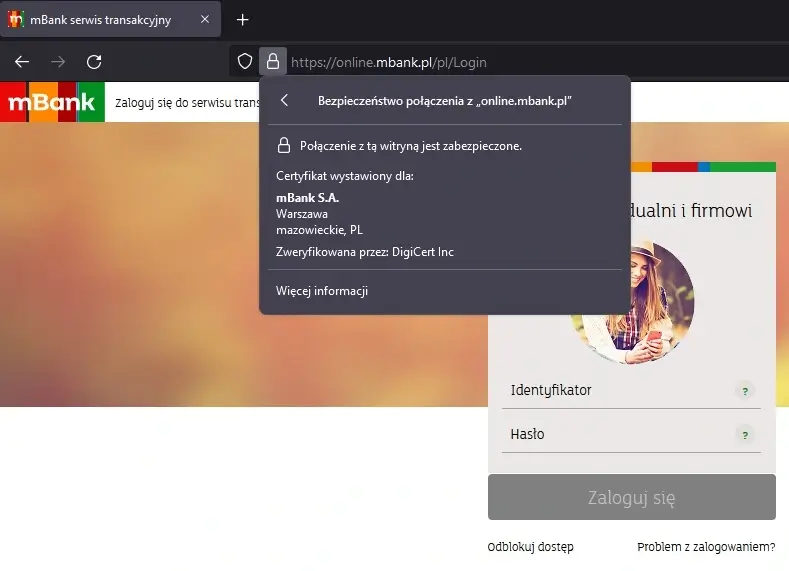
Figure 3 - SSL encryption on the mBank website
The additional services offered by these solutions also overlap. An integrated antivirus engine is often unnecessary when using Windows 10 or 11, as the latest Microsoft systems already have Windows Defender installed and running by default. Therefore, if your primary goal is to increase your internet security, a VPN may prove to be of little use in such a situation – existing, used solutions will be completely ineffective.
Your IT.
our
support.
our
support.
Contact us
FAQ
What does an IT company do? What IT solutions do we use at Support Online?
When is it worth using an IT company?
Why is it worth hiring an IT company rather than a freelance IT specialist?
What are the advantages of working with IT Support Online?
What IT solutions do we use at Support Online?
When is it worth using an IT company?
Why is it worth hiring an IT company rather than a freelance IT specialist?
What are the advantages of working with IT Support Online?
What IT solutions do we use at Support Online?
When is it worth using an IT company?
Why is it worth hiring an IT company rather than a freelance IT specialist?
What are the advantages of working with IT Support Online?
An IT company, or IT firm, deals with information technology in a broad sense. This includes, among other things:
- Software design and development: An IT company can create custom applications for other companies or software products for the mass market. Depending on their specialization, these can include mobile applications, desktop applications, web applications, or embedded systems.
- Consulting services: An IT company often provides experts to advise on implementing new technologies, optimizing business processes, or selecting appropriate technological solutions.
- Cloud solutions: Many IT companies specialize in implementing and managing cloud solutions, such as data storage, application hosting, and data analysis platforms.
- IT security: Protection against cyberattacks, security audits, implementing security policies, and network monitoring are just some of the IT companies' responsibilities in this area.
- IT infrastructure management: In this area, a company may manage servers, databases, networks, and endpoints.
- Technical Support and Service: An IT company may provide support for its own products or general IT support for other companies, managing their technology on a daily basis.
- Training: Many IT providers also offer training in software use and secure technology use.
- Hardware Solutions: Some IT companies may also provide and configure computer, server, or network hardware.
Depending on their specialization and size, an IT company may offer one, several, or all of the above solutions. When choosing a provider, it's important to thoroughly understand their services and tailor them to your individual needs.
At Support Online, we have been supporting companies for years with
- comprehensive user support (both on-site and remotely),
- we service computers, phones, tablets, and related network issues,
- we specialize in server administration: Windows, Linux/Unix,
- we support virtualizers such as KVM, Hyper-V, VMWare, and Proxmox,
- we support cloud services, particularly solutions such as Azure, Microsoft 365, and AWS,
- we monitor servers and devices on the internet,
- we consult on development, DRP, and support the stability of your business in the IT layer.
If you're looking for a good IT company, Support Online is the right place to grow your business.
It's worth using an IT company like Support Online when:
- You plan to implement new technologies or software in your company.
- You need specialized technology consulting.
- You want to optimize existing IT processes.
- You struggle with digital security issues.
- You need support in managing your IT infrastructure.
- You lack internal resources or expertise to implement certain technology projects.
Using external IT experts can bring benefits in terms of saving time and resources, and ensuring high-quality solutions.
Hiring an IT company like Support Online offers several key benefits over an IT freelancer:
- Support from the entire team: An IT company has a full team of specialists, from DevOps specialists and Cyber Security Specialists to IT Helpdesk Specialists, who possess diverse skills and experience, enabling faster problem resolution and the implementation of more complex projects.
- Reliability and stability: IT companies have an established reputation and track record, which can translate into greater reliability and stability of services.
- Maintenance and support: An IT company can offer service contracts, warranties, and after-sales support, which may be more difficult to obtain from an individual freelancer.
- Resources: Companies have access to more resources, tools, and technologies that can accelerate and improve project execution.
- Long-term availability: The risk of a freelancer disappearing or changing careers is greater than the risk of a well-established company going out of business.
However, it's worth noting that the choice between a company and a freelancer depends on your specific needs and situation. If you value peace of mind and a quick response to unexpected problems, it is worth choosing an IT company such as Support Online.
Partnering with IT Support Online offers the following advantages:
- Professional IT outsourcing: The company guarantees high-quality IT outsourcing services for businesses of all sizes.
- Comprehensive IT support: IT Support Online provides comprehensive IT support that meets the diverse needs of businesses.
- Saves time and money: With our support, clients can focus on their core business activities while reducing the costs associated with information technology management.
- Serving a diverse range of businesses: The company specializes in serving both small and medium-sized enterprises and large corporations, demonstrating its flexibility and ability to adapt to diverse client needs.
- Leadership in IT outsourcing: The company is recognized as a leader in IT outsourcing, particularly in the Poznań and Warsaw regions.
By partnering with our company, IT Support Online, businesses can count on a high standard of service and professionalism at every stage of the relationship.


