Article
migrations and backups
Backup and Replication – what are they for, how do they differ, how do they complement each other?
In today's age, where data is an invaluable asset for businesses, managing information security and availability is a key element of IT strategy. High availability services, backup, and data replication play a crucial role in protecting and securing data. In this article, we'll discuss high availability and how backup services impact it.
High Availability - Priority Goal
High Availability (HA) is a state in which services and applications are available to users most of the time, minimizing downtime. For many companies, especially those operating in the online services sector, high availability is an absolute priority. Data downtime can lead to customer loss, reputational damage, and significant financial losses.
Basic features of HA:
- Redundancy: HA relies on redundancy, which means having multiple copies of critical components such as servers, disks, power supplies, and network connections to minimize single points of failure.
- Failover: When one component fails, the system automatically fails over to other working components, minimizing downtime and threats to business continuity.
- Monitoring: An HA system continuously monitors the health of all infrastructure components to take appropriate corrective action if necessary.
- Disaster Recovery: HA systems are capable of automatically recovering from failures and returning to normal operation.
Disaster Recovery - The Key to High Availability
Disaster Recovery (DR) is a plan of action in the event of a failure or disaster, aimed at restoring normal operation of systems and services in the shortest possible time. A DR strategy identifies the procedures, tools, and resources necessary to minimize the impact of a disaster on business operations.
Disaster Recovery Ingredients:
- Disaster Response Planning: Defining procedures and assigning responsibilities in the event of a disaster.
- Backup Recovery: Using regular backups to restore data after a disaster.
- Off-Site Replication: Maintaining copies of data and servers in a remote data center to provide protection against a local disaster.
- Service Restoration to an Alternate Environment: Creating a test or alternate environment where key applications and services can be quickly restored.
- Testing and Verification: Regularly conducting DR exercises and tests to ensure the plan is working and can be effectively restored after a disaster.
It is worth knowing that backup and replication are two separate data security mechanisms that serve different purposes, but they can be effectively combined to provide more comprehensive data protection.
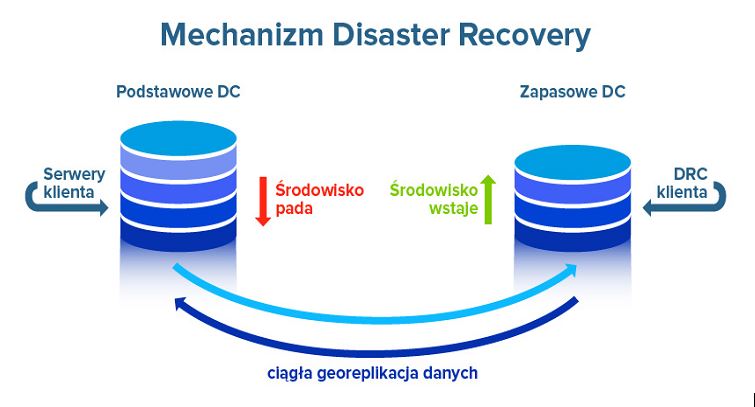
Backup and Replication as DR Strategy Tools
Backup and replication are two key techniques implemented as part of a DR strategy to help achieve high availability. Here's how these tools function in the context of HA:
Backup - Protection against Data Loss
Backup is the process of creating copies of data at regular intervals. It serves as a form of protection against data loss in the event of failures, user errors, or attacks.
The main features of backup are:
- Preserving historical data: Backups allow you to store copies of data from different points in time, enabling you to restore data to a state prior to a failure.
- Minimizing data loss: In the event of data loss, backups help minimize loss by restoring copies from a specific point in time.
- Protection against various types of threats: Backups protect against hardware failures, ransomware attacks, human error, and other types of data loss.
Backup types:
- Full backup: Copies all data, both changed and previously saved. This is the most complete and time-consuming form of backup.
- Differential backup: Copies only data that has changed since the last full backup. It is more cost-effective compared to a full backup, but may sometimes require a longer restore time.
- Incremental backup: Copies only data that has changed since the last backup. It offers more efficient use of disk space, but may require more time to restore data.
- Synthetic full backup: Creates a full backup by combining the last full backup and all incremental backups taken since then. It offers efficient backup management and reduced restore times.
Data Replication - Ensuring Consistency and Availability:
Replication is the process of continuously copying data from one location to another in real time. Its primary purpose is to ensure data consistency and service availability.
The main features of replication are:
- Instant data consistency: Replication ensures that data on replicated servers is nearly identical to the data on the primary server, minimizing availability losses.
- Fast failover: If the primary server fails, users can be immediately redirected to replicated servers, reducing downtime.
- Control over geographic redundancy: Replication allows for the creation of copies of data in remote locations, protecting against natural disasters or local outages.
Types of replication:
Synchronous replication: Data is copied to the second server in real time. The write process is paused until the data has been written to both servers. This offers the highest level of data consistency but may introduce some performance delays.

Asynchronous replication: Data is copied to a second server after some delay. This provides greater flexibility and performance, but can lead to some degree of data inconsistency between replicas in the event of a failure.
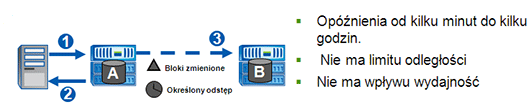
Differences between Backup and Replication:
Although backup and replication share a similar goal of protecting data, they are two different data security strategies that differ in several aspects:
- Primary Purpose:
- Backup: The primary purpose of backup is to create backup copies of data for recovery in the event of data loss.
- Replication: The primary purpose of replication is to ensure real-time data availability in the event of a failure.
- Recovery Time:
- Backup: The process of restoring data from a backup can be time-consuming, especially for large data sets.
- Replication: Replication allows for a quick switch to a replicated server without the need for data recovery.
- Data Consistency:
- Backup: Backups can lead to some data loss, especially if they are performed infrequently. There can be a gap between the last backup and the failure, resulting in data loss from that period.
- Replication: Replication ensures high data consistency by continuously and instantly copying data between different servers or devices. This means that any change made on the primary server is reflected almost immediately on all replicated devices. Data consistency within the context of replication is maintained in real time, minimizing the risk of discrepancies between data on different devices.
- Resource Usage:
- Backup: Backups require allocating a certain amount of disk space to store backup copies of data. The larger the data volume, the more disk space is required to maintain historical copies. Full and differential backups, in particular, can consume significant space, which impacts planning and disk management.
The processing power requirements for backups are typically not very intensive. Backups can be scheduled for quieter hours to avoid disrupting system performance during peak hours.
Backups can be performed on remote servers or devices, which can impact network utilization. Transferring large amounts of data over the network can potentially strain the network connection.
- Replication: Replication generates constant network and disk load to maintain constant balance between servers. It requires rapid, real-time data transfer between replicated servers, which can be costly in terms of network utilization.
Disk space usage for replication is typically lower than for full backups, as only changes to the data are replicated. However, long-term replication and maintaining multiple replicated servers can lead to the need for more disk space.
Replication may require more computing power than standard backups, as the system must constantly monitor data changes and relay them to the replicated servers in real time.
Backup and replication - a comprehensive data protection strategy:
Although backup and replication are two different data protection strategies, they can be effectively combined into a comprehensive strategy for securing data against loss and ensuring high service availability.
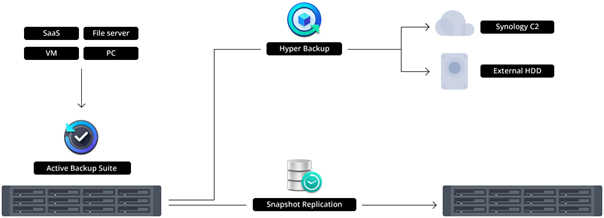
- Minimizing the risk of data loss: Replication ensures rapid failover to a working server in the event of a failure, minimizing downtime and ensuring business continuity. However, to protect data from software failures, ransomware attacks, and user errors, regular backups can be used as an additional layer of protection.
- Geographic redundancy: A combination of backup and replication can be used to provide geographic data redundancy. Backups can be stored in remote locations to protect data from natural disasters or local outages, while replication ensures continuous data availability.
- Ensuring consistency and availability: Replication can ensure high data availability by allowing for rapid failover to a replicated server in the event of a failure. However, to maintain data consistency between replicas and protect data from failures or irreversible changes, backups are key elements of a comprehensive data protection strategy.
- Selection of the appropriate strategy: It is important to tailor the backup and replication strategy to the unique requirements of the company and its infrastructure. Some data may require more frequent replication due to its criticality, while others may be more suitable for backup due to its less dynamic nature.
Summary:
This article focuses on the issues of high availability of services and data backup and replication. It can be stated that the key goal is to ensure high availability (HA) in enterprise operations. To achieve this goal, backup and replication play a key role as supporting measures for this concept.
Backup primarily serves as protection against data loss and enables data recovery in the event of a failure. Replication, on the other hand, ensures real-time data availability, minimizing system downtime. Both mechanisms complement each other.
It is worth emphasizing that implementing an HA, backup, and replication strategy is an investment in the stability and security of enterprise operations. Selecting the appropriate tools and technologies that align with an organization's needs is a key step in ensuring operational continuity, data protection, and maintaining the trust of customers and business partners.
Your IT.
our
support.
our
support.
Contact us
FAQ
What does an IT company do? What IT solutions do we use at Support Online?
When is it worth using an IT company?
Why is it worth hiring an IT company rather than a freelance IT specialist?
What are the advantages of working with IT Support Online?
What IT solutions do we use at Support Online?
When is it worth using an IT company?
Why is it worth hiring an IT company rather than a freelance IT specialist?
What are the advantages of working with IT Support Online?
What IT solutions do we use at Support Online?
When is it worth using an IT company?
Why is it worth hiring an IT company rather than a freelance IT specialist?
What are the advantages of working with IT Support Online?
An IT company, or IT firm, deals with information technology in a broad sense. This includes, among other things:
- Software design and development: An IT company can create custom applications for other companies or software products for the mass market. Depending on their specialization, these can include mobile applications, desktop applications, web applications, or embedded systems.
- Consulting services: An IT company often provides experts to advise on implementing new technologies, optimizing business processes, or selecting appropriate technological solutions.
- Cloud solutions: Many IT companies specialize in implementing and managing cloud solutions, such as data storage, application hosting, and data analysis platforms.
- IT security: Protection against cyberattacks, security audits, implementing security policies, and network monitoring are just some of the IT companies' responsibilities in this area.
- IT infrastructure management: In this area, a company may manage servers, databases, networks, and endpoints.
- Technical Support and Service: An IT company may provide support for its own products or general IT support for other companies, managing their technology on a daily basis.
- Training: Many IT providers also offer training in software use and secure technology use.
- Hardware Solutions: Some IT companies may also provide and configure computer, server, or network hardware.
Depending on their specialization and size, an IT company may offer one, several, or all of the above solutions. When choosing a provider, it's important to thoroughly understand their services and tailor them to your individual needs.
At Support Online, we have been supporting companies for years with
- comprehensive user support (both on-site and remotely),
- we service computers, phones, tablets, and related network issues,
- we specialize in server administration: Windows, Linux/Unix,
- we support virtualizers such as KVM, Hyper-V, VMWare, and Proxmox,
- we support cloud services, particularly solutions such as Azure, Microsoft 365, and AWS,
- we monitor servers and devices on the internet,
- we consult on development, DRP, and support the stability of your business in the IT layer.
If you're looking for a good IT company, Support Online is the right place to grow your business.
It's worth using an IT company like Support Online when:
- You plan to implement new technologies or software in your company.
- You need specialized technology consulting.
- You want to optimize existing IT processes.
- You struggle with digital security issues.
- You need support in managing your IT infrastructure.
- You lack internal resources or expertise to implement certain technology projects.
Using external IT experts can bring benefits in terms of saving time and resources, and ensuring high-quality solutions.
Hiring an IT company like Support Online offers several key benefits over an IT freelancer:
- Support from the entire team: An IT company has a full team of specialists, from DevOps specialists and Cyber Security Specialists to IT Helpdesk Specialists, who possess diverse skills and experience, enabling faster problem resolution and the implementation of more complex projects.
- Reliability and stability: IT companies have an established reputation and track record, which can translate into greater reliability and stability of services.
- Maintenance and support: An IT company can offer service contracts, warranties, and after-sales support, which may be more difficult to obtain from an individual freelancer.
- Resources: Companies have access to more resources, tools, and technologies that can accelerate and improve project execution.
- Long-term availability: The risk of a freelancer disappearing or changing careers is greater than the risk of a well-established company going out of business.
However, it's worth noting that the choice between a company and a freelancer depends on your specific needs and situation. If you value peace of mind and a quick response to unexpected problems, it is worth choosing an IT company such as Support Online.
Partnering with IT Support Online offers the following advantages:
- Professional IT outsourcing: The company guarantees high-quality IT outsourcing services for businesses of all sizes.
- Comprehensive IT support: IT Support Online provides comprehensive IT support that meets the diverse needs of businesses.
- Saves time and money: With our support, clients can focus on their core business activities while reducing the costs associated with information technology management.
- Serving a diverse range of businesses: The company specializes in serving both small and medium-sized enterprises and large corporations, demonstrating its flexibility and ability to adapt to diverse client needs.
- Leadership in IT outsourcing: The company is recognized as a leader in IT outsourcing, particularly in the Poznań and Warsaw regions.
By partnering with our company, IT Support Online, businesses can count on a high standard of service and professionalism at every stage of the relationship.


