Windows 11 – What are the requirements? Is it worth upgrading?
Six years after the launch of Windows 10, Windows 11 was unexpectedly released in early October, without any major announcements. It is currently available as a free update for users of previous versions of Windows. However, not everyone will be able to test it, as Microsoft has set some rather stringent requirements.
What's new in Windows 11?
What's new in Windows 11? The first thing that catches the eye after launching Windows 11 is the change in appearance. Microsoft has opted for rounded window corners, similar to macOS, and some core system apps have also undergone a facelift. By default, the taskbar has been moved to the center, but you can change its position in the settings to resemble previous versions of Windows. System icons have pastel colors, and the appearance of right-click slide-outs has been changed. To return to the old look, you must now select "Show more."
Android App Support in Windows 11
The second major change is the addition of native support for Android apps. While Samsung previously offered similar functionality to its phone users, it is now an integral part of the system. Thanks to the Amazon App Store, every Windows user will soon be able to run their favorite mobile apps.
Microsoft has also recognized the growing popularity of fast NVMe drives and ported the Direct Storage technology, already known from the Xbox Series X console. This will ensure significantly faster data transfer, reducing level loading times in games. Simply put, this solution allows for direct transfer of information from the graphics card to storage, bypassing the processor. Of course, to take advantage of this technology, it must be implemented in existing games. Another feature that may be of interest to gamers (and graphic designers) is AutoHDR, which improves the quality of displayed colors and tones. HDR stands for High-Dynamic Range.
Microsoft Teams Integration in Windows 11
Another feature is Microsoft Teams integration. Previously part of the Microsoft 365 suite, it will now become part of the system and serve as the primary messaging app for Windows users.
Windows 11 Requirements
The official Microsoft website provides basic information on the requirements computers must meet to install Windows 11. In addition to the basic requirements of memory and processor speed, the system also requires TPM version 2.0 and UEFI with Secure Boot support.
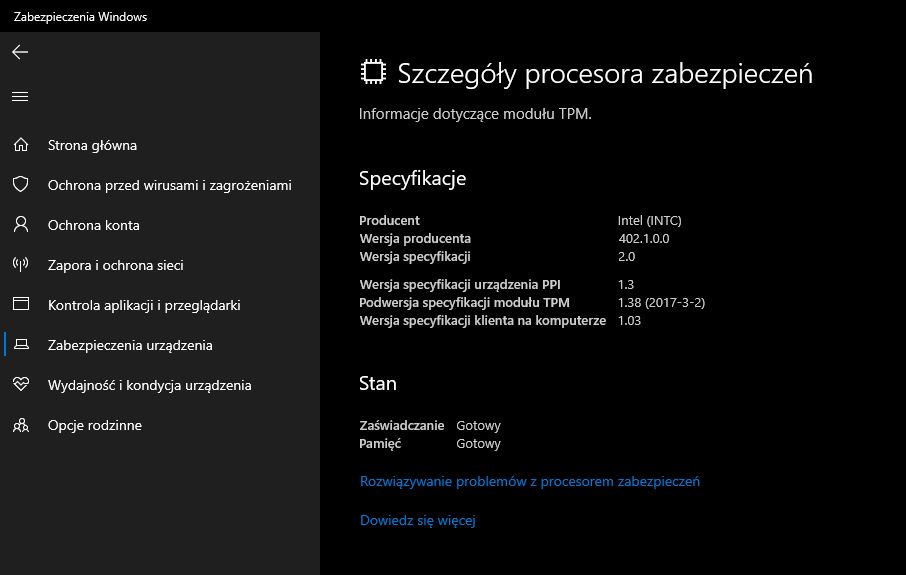
What is a TPM module and why is it required? It's used to create and store cryptographic keys for services like Bitlocker, Windows Hello, and private keys. Microsoft states that they chose this solution to increase the security of their operating system.
To check whether a Windows 10 computer has the aforementioned module, simply open System Settings, go to the Updates and Security tab, then Windows Security, and select Device Security. Among the several available options, you'll find the Security Processor Details option.
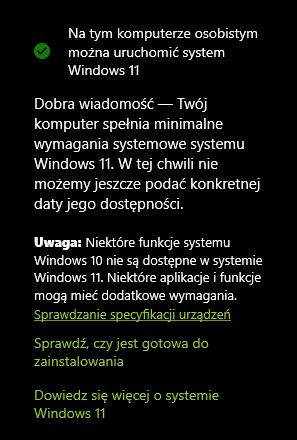
For those whose computer meets the requirements, there are several ways to install Windows 11. The first and most basic method is, of course, installing the system from a USB drive or DVD. Existing Windows 10 users can also perform a free, automatic update from the System Settings menu. For computers that meet the above requirements, you should see the information shown in the screenshot below.
Additionally, Microsoft has prepared a special tool for checking your computer's health, called "PC Health Check." It also lets you check whether your computer meets the minimum requirements. You can download it directly from this link.
Windows 11 - An Evolution Worth the Wait?
The final question remains: is it worth updating to the latest version? Beyond the purely cosmetic changes, new features for gamers, such as AutoHDR, Direct Storage, and DirectX 12 support, are undoubtedly the focus. Another interesting feature is the ability to run Android apps natively in Windows.
Most of these features will take time to arrive, as they weren't introduced with the system's launch. Currently, only beta testers have access to them, and the Amazon App Store app isn't yet available in the Microsoft Store. The new features are certainly not something that will convince users to upgrade to the new version of the system. This is definitely not a revolution, but an evolution, with the focus primarily on visual changes.
Looking for professional support for your company? We offer comprehensive IT services based on our knowledge and 20 years of experience in the IT industry. Contact us and we will prepare modern solutions that will improve the operation of your company. We will conduct an IT audit to better understand your IT environment, and then together we will develop a plan to improve it.
Our offer includes not only IT services and IT outsourcing, but also consulting and training.
We invite you to contact us!
our
support.
 What IT solutions do we use at Support Online?
When is it worth using an IT company?
Why is it worth hiring an IT company rather than a freelance IT specialist?
What are the advantages of working with IT Support Online?
What IT solutions do we use at Support Online?
When is it worth using an IT company?
Why is it worth hiring an IT company rather than a freelance IT specialist?
What are the advantages of working with IT Support Online?
An IT company, or IT firm, deals with information technology in a broad sense. This includes, among other things:
- Software design and development: An IT company can create custom applications for other companies or software products for the mass market. Depending on their specialization, these can include mobile applications, desktop applications, web applications, or embedded systems.
- Consulting services: An IT company often provides experts to advise on implementing new technologies, optimizing business processes, or selecting appropriate technological solutions.
- Cloud solutions: Many IT companies specialize in implementing and managing cloud solutions, such as data storage, application hosting, and data analysis platforms.
- IT security: Protection against cyberattacks, security audits, implementing security policies, and network monitoring are just some of the IT companies' responsibilities in this area.
- IT infrastructure management: In this area, a company may manage servers, databases, networks, and endpoints.
- Technical Support and Service: An IT company may provide support for its own products or general IT support for other companies, managing their technology on a daily basis.
- Training: Many IT providers also offer training in software use and secure technology use.
- Hardware Solutions: Some IT companies may also provide and configure computer, server, or network hardware.
Depending on their specialization and size, an IT company may offer one, several, or all of the above solutions. When choosing a provider, it's important to thoroughly understand their services and tailor them to your individual needs.
At Support Online, we have been supporting companies for years with
- comprehensive user support (both on-site and remotely),
- we service computers, phones, tablets, and related network issues,
- we specialize in server administration: Windows, Linux/Unix,
- we support virtualizers such as KVM, Hyper-V, VMWare, and Proxmox,
- we support cloud services, particularly solutions such as Azure, Microsoft 365, and AWS,
- we monitor servers and devices on the internet,
- we consult on development, DRP, and support the stability of your business in the IT layer.
If you're looking for a good IT company, Support Online is the right place to grow your business.
It's worth using an IT company like Support Online when:
- You plan to implement new technologies or software in your company.
- You need specialized technology consulting.
- You want to optimize existing IT processes.
- You struggle with digital security issues.
- You need support in managing your IT infrastructure.
- You lack internal resources or expertise to implement certain technology projects.
Using external IT experts can bring benefits in terms of saving time and resources, and ensuring high-quality solutions.
Hiring an IT company like Support Online offers several key benefits over an IT freelancer:
- Support from the entire team: An IT company has a full team of specialists, from DevOps specialists and Cyber Security Specialists to IT Helpdesk Specialists, who possess diverse skills and experience, enabling faster problem resolution and the implementation of more complex projects.
- Reliability and stability: IT companies have an established reputation and track record, which can translate into greater reliability and stability of services.
- Maintenance and support: An IT company can offer service contracts, warranties, and after-sales support, which may be more difficult to obtain from an individual freelancer.
- Resources: Companies have access to more resources, tools, and technologies that can accelerate and improve project execution.
- Long-term availability: The risk of a freelancer disappearing or changing careers is greater than the risk of a well-established company going out of business.
However, it's worth noting that the choice between a company and a freelancer depends on your specific needs and situation. If you value peace of mind and a quick response to unexpected problems, it is worth choosing an IT company such as Support Online.
Partnering with IT Support Online offers the following advantages:
- Professional IT outsourcing: The company guarantees high-quality IT outsourcing services for businesses of all sizes.
- Comprehensive IT support: IT Support Online provides comprehensive IT support that meets the diverse needs of businesses.
- Saves time and money: With our support, clients can focus on their core business activities while reducing the costs associated with information technology management.
- Serving a diverse range of businesses: The company specializes in serving both small and medium-sized enterprises and large corporations, demonstrating its flexibility and ability to adapt to diverse client needs.
- Leadership in IT outsourcing: The company is recognized as a leader in IT outsourcing, particularly in the Poznań and Warsaw regions.
By partnering with our company, IT Support Online, businesses can count on a high standard of service and professionalism at every stage of the relationship.


