Veeam – description of the free backup tool
A secure backup for home use. Just a few years ago, each of us had a stack of binders containing our most essential documents. Today, virtually every office and bank offers digital document signing. When shopping online, we receive bills and invoices electronically, and when making transfers, we can generate confirmations in...
Secure Backup for Home Use
Just a few years ago, everyone had a stack of binders containing their most essential documents. Today, virtually every office and bank offers digital document signing options. When shopping online, we receive bills and invoices electronically, and when making transfers, we can generate confirmations in PDF format. Therefore, binders are slowly becoming a thing of the past, being replaced by various types of portable drives.
How can we keep our data stored on our computers safe? Manually creating backups can be time-consuming and complicated, and it doesn't guarantee that everything was done correctly. What if a file we've been working on for a long time and was supposed to remain unchanged is accidentally overwritten? At this point, the possibility of recovering it is practically zero and will require the help of a data recovery specialist. This also takes time and money, and offers no guarantee that the lost data will be recovered. Furthermore, returning a drive with all our data on it deprives us of the ability to continue working.
Therefore, it's currently recommended to use programs that automate the backup process and perform incremental backups. This allows us to restore previous file versions using a simple wizard, often integrated with the program itself.
Which backup software should you choose?
When choosing a backup software, you should consider several aspects.
Pay attention to the business profile of the company responsible for the software.
It often happens that developers release a virtually identical product every year, replacing the old version, requiring a fee. This means that after a year of purchase, you lose any program updates that may fix bugs, security vulnerabilities, or ensure compatibility with the new operating system.
Make sure the program has the required functionality (such as the previously mentioned incremental backups) and supports the storage device you're using.
Sometimes, a given program doesn't allow you to save data to a network location or requires an additional fee because the free version only allows you to use local storage or doesn't offer incremental backups. Therefore, it's worth thoroughly reviewing the features offered by a given solution before installing it.
Do you really need paid software for home use?
There are many good, free solutions that are budget-friendly and offer the functionality we need. One example is Veeam Agent, a free program available for download directly from the manufacturer's website: https://www.veeam.com/agent-for-windows-community-edition.html
Configuring Veeam Agent for Windows
A sample configuration and backup method will be presented using the Veeam program mentioned above. Founded in 2006 in the United States, this company has been providing backup and recovery software for both on-premises and cloud-based solutions, as well as virtualization, for years. It is available for a variety of operating systems, including Windows, Linux, and MacOS.
Installing the program is straightforward. Simply download the installer, run it, and complete the installation process, which prompts you to specify the installation location. Immediately after installation, the program will prompt you to create recovery media, which is entirely optional. After completing the installation, the main window of the configured program will look like this:
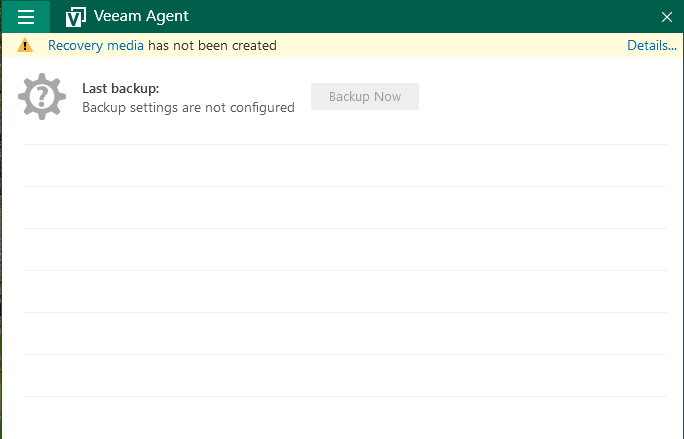
From this level, after clicking on the three horizontal bars visible in the upper left part of the window, we can add a backup task.

After selecting "Add New Job...", you'll be taken to a new window with a new job wizard.
Here you can choose, among other things, what exactly should be backed up – whether it's the entire computer, a specific drive, or just a folder. Here you can also specify the backup location and the dates on which the backup should occur.
- Backup Mode: Choose whether you want to back up the entire computer (Entire computer), a specific disk (Volume-level backup), or specific files and folders (File-level backup).
- Destination: Specify the location for the backup. This can be a local disk, a network location (as shown in the image below), or a Veeam repository located on a server.
- Shared Folder: Allows you to enter credentials for network locations requiring a login and password, as well as select the data compression level. This is especially useful when you have large amounts of data that need to be transferred over the local network, which can cause slow performance or even connection interruptions.
- Schedule: This tab configures the backup frequency. Here, you can specify individual days for backups and edit them to suit your needs.
- Summary: A list of previously selected options will be displayed as a summary. Here, you can verify that the settings are correct.
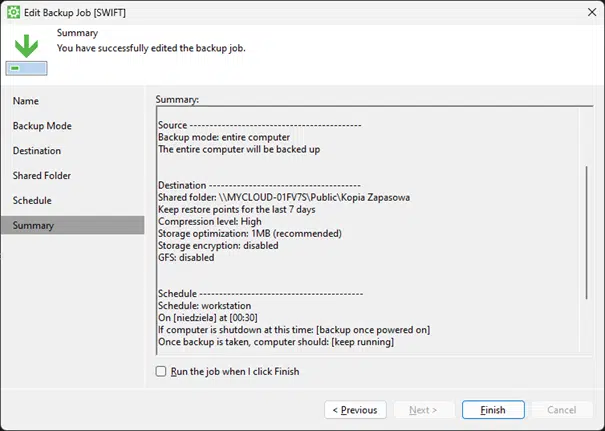
After selecting the "Run the job when I click Finish" option, the first backup will be started. The time required to complete the job varies and depends on the amount of data, processor speed, hard drive type, backup media, and network card speed.
Recovering Data from a Previous Backup
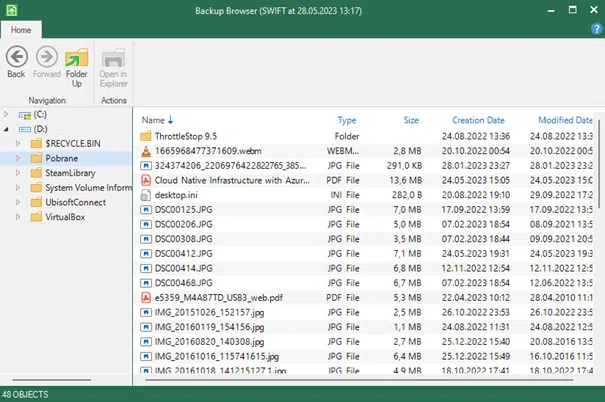
Data can be recovered from a previously created backup in two ways. The first is from the main program window, after selecting "Restore Files" or "Restore Volumes." The second is located in the left-hand side menu beneath the three horizontal bars. Then, search for the job name and, as above, select one of the two options. The wizard shown below will open, allowing you to search for and recover your file.
As the example above shows, configuration shouldn't pose any major problems for someone familiar with computers, even at a basic level. A good backup policy is crucial not only for companies and businesses, but also for the average home user. Losing access to our data can be very unpleasant, whether it's vacation photos and videos, bills, or any other documents. Choosing the right program to back up our data will save us not only stress but also time, because after the initial configuration, it will work in the background, without interrupting our daily tasks.
our
support.
 What IT solutions do we use at Support Online?
When is it worth using an IT company?
Why is it worth hiring an IT company rather than a freelance IT specialist?
What are the advantages of working with IT Support Online?
What IT solutions do we use at Support Online?
When is it worth using an IT company?
Why is it worth hiring an IT company rather than a freelance IT specialist?
What are the advantages of working with IT Support Online?
An IT company, or IT firm, deals with information technology in a broad sense. This includes, among other things:
- Software design and development: An IT company can create custom applications for other companies or software products for the mass market. Depending on their specialization, these can include mobile applications, desktop applications, web applications, or embedded systems.
- Consulting services: An IT company often provides experts to advise on implementing new technologies, optimizing business processes, or selecting appropriate technological solutions.
- Cloud solutions: Many IT companies specialize in implementing and managing cloud solutions, such as data storage, application hosting, and data analysis platforms.
- IT security: Protection against cyberattacks, security audits, implementing security policies, and network monitoring are just some of the IT companies' responsibilities in this area.
- IT infrastructure management: In this area, a company may manage servers, databases, networks, and endpoints.
- Technical Support and Service: An IT company may provide support for its own products or general IT support for other companies, managing their technology on a daily basis.
- Training: Many IT providers also offer training in software use and secure technology use.
- Hardware Solutions: Some IT companies may also provide and configure computer, server, or network hardware.
Depending on their specialization and size, an IT company may offer one, several, or all of the above solutions. When choosing a provider, it's important to thoroughly understand their services and tailor them to your individual needs.
At Support Online, we have been supporting companies for years with
- comprehensive user support (both on-site and remotely),
- we service computers, phones, tablets, and related network issues,
- we specialize in server administration: Windows, Linux/Unix,
- we support virtualizers such as KVM, Hyper-V, VMWare, and Proxmox,
- we support cloud services, particularly solutions such as Azure, Microsoft 365, and AWS,
- we monitor servers and devices on the internet,
- we consult on development, DRP, and support the stability of your business in the IT layer.
If you're looking for a good IT company, Support Online is the right place to grow your business.
It's worth using an IT company like Support Online when:
- You plan to implement new technologies or software in your company.
- You need specialized technology consulting.
- You want to optimize existing IT processes.
- You struggle with digital security issues.
- You need support in managing your IT infrastructure.
- You lack internal resources or expertise to implement certain technology projects.
Using external IT experts can bring benefits in terms of saving time and resources, and ensuring high-quality solutions.
Hiring an IT company like Support Online offers several key benefits over an IT freelancer:
- Support from the entire team: An IT company has a full team of specialists, from DevOps specialists and Cyber Security Specialists to IT Helpdesk Specialists, who possess diverse skills and experience, enabling faster problem resolution and the implementation of more complex projects.
- Reliability and stability: IT companies have an established reputation and track record, which can translate into greater reliability and stability of services.
- Maintenance and support: An IT company can offer service contracts, warranties, and after-sales support, which may be more difficult to obtain from an individual freelancer.
- Resources: Companies have access to more resources, tools, and technologies that can accelerate and improve project execution.
- Long-term availability: The risk of a freelancer disappearing or changing careers is greater than the risk of a well-established company going out of business.
However, it's worth noting that the choice between a company and a freelancer depends on your specific needs and situation. If you value peace of mind and a quick response to unexpected problems, it is worth choosing an IT company such as Support Online.
Partnering with IT Support Online offers the following advantages:
- Professional IT outsourcing: The company guarantees high-quality IT outsourcing services for businesses of all sizes.
- Comprehensive IT support: IT Support Online provides comprehensive IT support that meets the diverse needs of businesses.
- Saves time and money: With our support, clients can focus on their core business activities while reducing the costs associated with information technology management.
- Serving a diverse range of businesses: The company specializes in serving both small and medium-sized enterprises and large corporations, demonstrating its flexibility and ability to adapt to diverse client needs.
- Leadership in IT outsourcing: The company is recognized as a leader in IT outsourcing, particularly in the Poznań and Warsaw regions.
By partnering with our company, IT Support Online, businesses can count on a high standard of service and professionalism at every stage of the relationship.


