Server Monitoring Systems (Part 2) Case Study
Today, servers are a key part of the IT infrastructure for both businesses and organizations. Their reliability, performance, and availability are crucial for maintaining the smooth operation of systems and services. However, to monitor server performance and avoid outages, it's essential to use appropriate monitoring tools. Server monitoring systems allow IT administrators to constantly monitor...
Server monitoring systems allow IT administrators to continuously monitor key performance indicators and identify potential issues. They allow them to quickly respond to emergencies, prevent system downtime, optimize resource utilization, and plan infrastructure scaling.
Whether you run a small business or manage a large server infrastructure, the right monitoring tools can be a key element in maintaining high server performance and reliability. So, let's continue this article to learn how to help.
Server Monitoring Challenges – What Difficulties Can Emerge and How to Overcome Them?
Server monitoring is a crucial element in maintaining the reliability and efficiency of IT infrastructure in companies and organizations. However, with increasing technological demands, server monitoring challenges also arise. In this article, we will discuss some of these challenges and present ways to overcome them.
1. Complex Server Infrastructure
One of the main challenges is managing complex server infrastructure, especially for large organizations. Having multiple servers, varying operating systems, and applications can make monitoring difficult and time-consuming. To address this challenge, consider implementing a comprehensive server monitoring tool that allows you to centralize and monitor all your servers simultaneously.

Example Host Network Map
2. The Need for 24/7 Monitoring
Monitoring servers only during specific hours can lead to delayed responses to potential problems, which can threaten business continuity. Therefore, 24/7 monitoring is essential to ensure rapid identification and response to failures or irregularities. Monitoring automation using continuous monitoring tools is a key element in addressing this challenge.
3. IT Service Monitoring
Many organizations focus on monitoring the server itself, forgetting about monitoring the key IT processes running on it. It's worth focusing on monitoring processes such as applications, services, databases, and even networks. This allows for early detection of potential problems, such as application slowdowns, database errors, or service unavailability. This allows for quick corrective action and minimizes the impact on business continuity.

Example of a Current Network Status
4. Business Continuity Plan
A business continuity plan (BCP) is a comprehensive plan designed to ensure an organization's operational continuity in the event of a server outage, natural disaster, cyberattack, or other unforeseen event. Server monitoring is a key element of this plan, as it enables early problem detection, rapid response, and minimizes the impact on business operations. Here are some important aspects that should be included in a BCP plan regarding server monitoring:
Determining Key Performance Indicators (KPIs)
The first step in developing a BCP plan is to identify key performance indicators (KPIs) that are relevant to the company's operations. These may include parameters such as server response time, resource utilization, network throughput, or service availability. Defining KPIs will allow you to establish acceptable performance levels and monitor servers to ensure they are met.
Choosing the Right Monitoring Tools
Next, you should select server monitoring tools that are appropriate for your business. There are many solutions available that enable server performance monitoring, log analysis, threat detection, and many other features. It's important that these tools are easy to use, offer comprehensive configuration options, and integrate with other company systems.
Continuous Monitoring and Real-Time Response
A key element of server monitoring in a BCP plan is continuous monitoring and real-time response to any anomalies. This means monitoring should run 24/7 to ensure rapid identification and resolution of issues. Automating monitoring processes and implementing alerts allows for immediate response to outages or other anomalies.
Regular Audits and Testing
It is important to regularly conduct server monitoring audits and emergency procedure tests to verify the effectiveness of the BCP plan. Testing can include simulating a server outage, a hacker attack, or other scenarios to verify the monitoring team's response and the effectiveness of the procedures adopted. Regular audits allow for the evaluation and improvement of the monitoring system.
Disaster Recovery Plan
Server Monitoring Implementation – Case Study
In today's technological world, where companies and organizations increasingly rely on IT infrastructure, server monitoring is becoming an essential element in maintaining performance, reliability, and security. One of our clients is a hotel chain where we successfully implemented a server monitoring system. Due to the company's rapid growth and the increasing number of servers being managed, performance management and failure prevention became crucial.
The case study presented in this article describes the implementation process, the benefits of server monitoring, and the steps taken to avoid failures.
Requirements Analysis and Tool Selection:
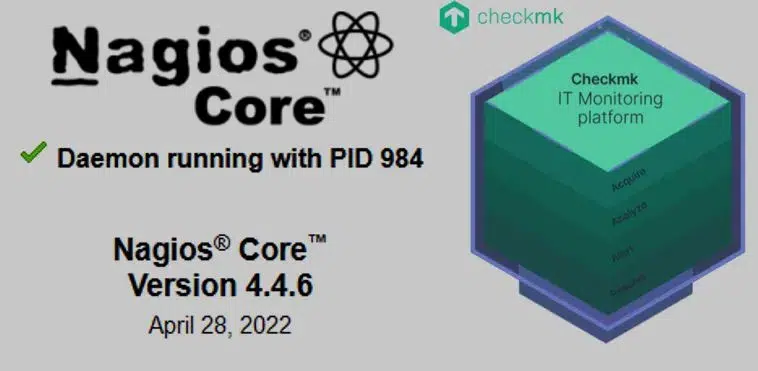
First, we analyzed the company's requirements and determined the key parameters to be monitored. We identified factors such as resource performance, server load, service availability, network throughput, and security. Based on these requirements, we selected the Nagios monitoring tool with the checkmk plugin, which provided monitoring capabilities for these parameters.
Implementation and Configuration
After selecting the monitoring tool, the process of implementing and configuring the monitoring system began. The IT Support-Online team installed the NSClient++ tool on a dedicated server and configured the appropriate monitoring parameters. Alarm thresholds and notifications were defined to ensure rapid identification and response to potential issues.
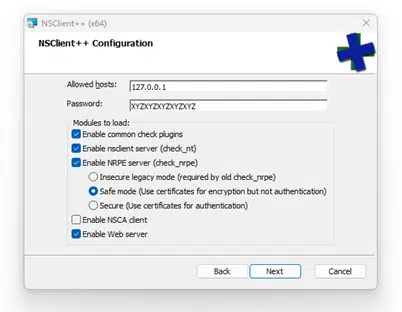
Sample NSClient++ Installer Configuration
Real-time Server Monitoring
After implementation, the server monitoring system was fully functional. The IT team could monitor servers in real time and receive notifications when alarm thresholds were exceeded. This allows technical staff to quickly respond to critical situations and minimize service downtime. Additionally, thanks to the established VPN connection, the networking department was able to add the IP addresses of all devices on the network to monitor their parameters.
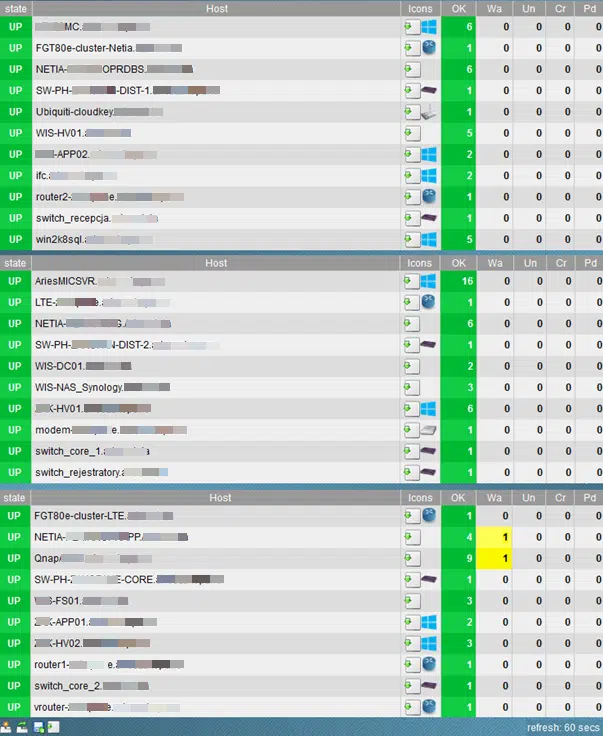
Example of monitored hosts
Data Analysis and Optimization
Data collected by the monitoring system was regularly analyzed and used to optimize server performance. The IT team could track trends, identify potential problems, and take corrective action. Based on these analyses, decisions were made regarding resource scaling, software updates, and server configuration optimization.
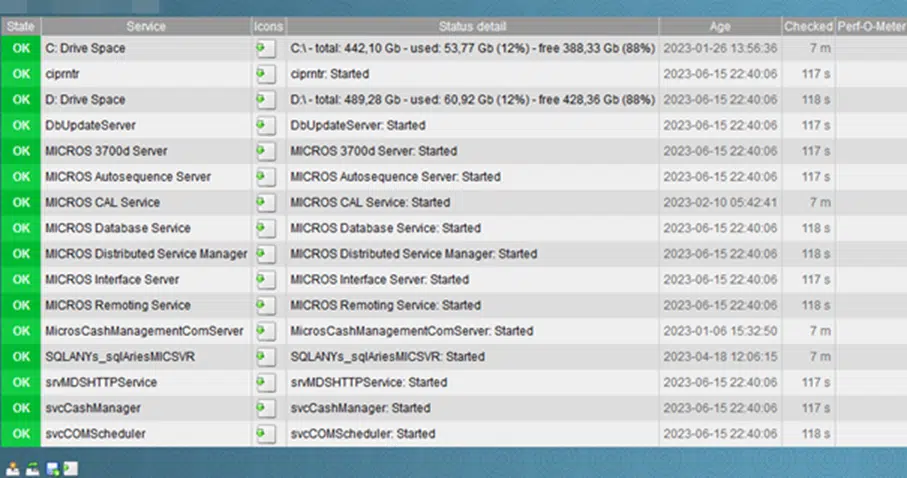
Example of monitored services

Example of Monitored Services
Server Monitoring - Benefits
Implementing a server monitoring system brought numerous benefits to the hotel chain. Primarily, the company was able to avoid server failures and service interruptions thanks to early problem detection and rapid response. This saved time and money by minimizing losses related to data loss, performance degradation, and customer service disruptions.
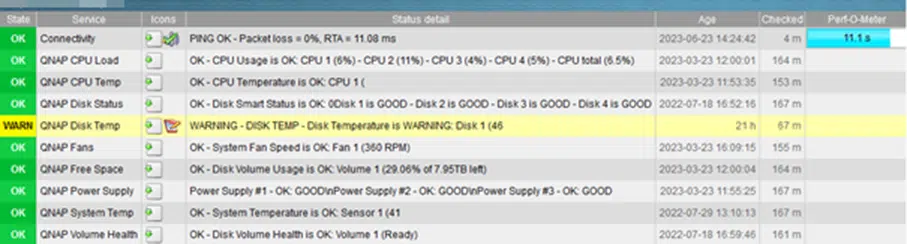
Example of a service monitoring alert

Example of a Service Monitoring Alert
Summary:
Incorporating IT environment monitoring into a business continuity plan is crucial. A BCP should include monitoring strategies, disaster response procedures, audits, and regular testing to ensure the effectiveness of the monitoring system.
24/7 server monitoring is crucial for maintaining business continuity. This allows for early detection of problems, rapid response, and prevention of potential failures. Server monitoring systems are crucial for maintaining business efficiency and continuity. Selecting the right tools, remote server administration, and implementing a business continuity plan are essential to avoiding outages, minimizing business impact, and ensuring the stability of your IT infrastructure. Effective server monitoring can help you achieve success in today's digital business environment.
our
support.
 What IT solutions do we use at Support Online?
When is it worth using an IT company?
Why is it worth hiring an IT company rather than a freelance IT specialist?
What are the advantages of working with IT Support Online?
What IT solutions do we use at Support Online?
When is it worth using an IT company?
Why is it worth hiring an IT company rather than a freelance IT specialist?
What are the advantages of working with IT Support Online?
An IT company, or IT firm, deals with information technology in a broad sense. This includes, among other things:
- Software design and development: An IT company can create custom applications for other companies or software products for the mass market. Depending on their specialization, these can include mobile applications, desktop applications, web applications, or embedded systems.
- Consulting services: An IT company often provides experts to advise on implementing new technologies, optimizing business processes, or selecting appropriate technological solutions.
- Cloud solutions: Many IT companies specialize in implementing and managing cloud solutions, such as data storage, application hosting, and data analysis platforms.
- IT security: Protection against cyberattacks, security audits, implementing security policies, and network monitoring are just some of the IT companies' responsibilities in this area.
- IT infrastructure management: In this area, a company may manage servers, databases, networks, and endpoints.
- Technical Support and Service: An IT company may provide support for its own products or general IT support for other companies, managing their technology on a daily basis.
- Training: Many IT providers also offer training in software use and secure technology use.
- Hardware Solutions: Some IT companies may also provide and configure computer, server, or network hardware.
Depending on their specialization and size, an IT company may offer one, several, or all of the above solutions. When choosing a provider, it's important to thoroughly understand their services and tailor them to your individual needs.
At Support Online, we have been supporting companies for years with
- comprehensive user support (both on-site and remotely),
- we service computers, phones, tablets, and related network issues,
- we specialize in server administration: Windows, Linux/Unix,
- we support virtualizers such as KVM, Hyper-V, VMWare, and Proxmox,
- we support cloud services, particularly solutions such as Azure, Microsoft 365, and AWS,
- we monitor servers and devices on the internet,
- we consult on development, DRP, and support the stability of your business in the IT layer.
If you're looking for a good IT company, Support Online is the right place to grow your business.
It's worth using an IT company like Support Online when:
- You plan to implement new technologies or software in your company.
- You need specialized technology consulting.
- You want to optimize existing IT processes.
- You struggle with digital security issues.
- You need support in managing your IT infrastructure.
- You lack internal resources or expertise to implement certain technology projects.
Using external IT experts can bring benefits in terms of saving time and resources, and ensuring high-quality solutions.
Hiring an IT company like Support Online offers several key benefits over an IT freelancer:
- Support from the entire team: An IT company has a full team of specialists, from DevOps specialists and Cyber Security Specialists to IT Helpdesk Specialists, who possess diverse skills and experience, enabling faster problem resolution and the implementation of more complex projects.
- Reliability and stability: IT companies have an established reputation and track record, which can translate into greater reliability and stability of services.
- Maintenance and support: An IT company can offer service contracts, warranties, and after-sales support, which may be more difficult to obtain from an individual freelancer.
- Resources: Companies have access to more resources, tools, and technologies that can accelerate and improve project execution.
- Long-term availability: The risk of a freelancer disappearing or changing careers is greater than the risk of a well-established company going out of business.
However, it's worth noting that the choice between a company and a freelancer depends on your specific needs and situation. If you value peace of mind and a quick response to unexpected problems, it is worth choosing an IT company such as Support Online.
Partnering with IT Support Online offers the following advantages:
- Professional IT outsourcing: The company guarantees high-quality IT outsourcing services for businesses of all sizes.
- Comprehensive IT support: IT Support Online provides comprehensive IT support that meets the diverse needs of businesses.
- Saves time and money: With our support, clients can focus on their core business activities while reducing the costs associated with information technology management.
- Serving a diverse range of businesses: The company specializes in serving both small and medium-sized enterprises and large corporations, demonstrating its flexibility and ability to adapt to diverse client needs.
- Leadership in IT outsourcing: The company is recognized as a leader in IT outsourcing, particularly in the Poznań and Warsaw regions.
By partnering with our company, IT Support Online, businesses can count on a high standard of service and professionalism at every stage of the relationship.


