Secure Passwords – Password Policy Recommendations
Today's digital world is increasingly vulnerable to cybersecurity threats. The number of cyberattacks, including successful ones, has increased significantly in recent years.
There are many different ways to protect yourself online. One of the basic, even elementary methods is a strong password. Have you ever wondered if your password is secure enough? Are you sure someone won't find it?
What passwords are insecure?
A long password doesn't always mean it's secure. For example, "hAix1111111111111111" is theoretically 20 characters long, but in practice, it's almost as weak as the five-character password "hAix1." Multiple repetitions of the same character should be avoided.
"January 2022!" is also a bad idea. Passwords related to dates are extremely popular; avoid using the year and month (the same goes for city names, countries, etc.).
You may come across lists of frequently used passwords online. If your password is on such a list, you should change it immediately.
Long, random passwords like "jD.3a>F!@91cHDGhh(*>236Phs##aA" are more secure. But how can you remember such a password? Wouldn't writing it down on a piece of paper or in a text file pose a threat? As if that weren't enough, after a few months, once you've memorized it, the system will ask you to change it...
What's a secure and easy-to-remember password?
The National Institute of Standards and Technology has issued guidelines that don't recommend periodically changing your password.
NIST believes that a password should be changed if you suspect it has been compromised.
It's also recommended to allow passwords to be created without a character limit.
It's good practice to use long sentences. "Ala.ma.kota.kot.ma.ale.ale.jej.nie.like" would be an easy-to-remember, effective password. For example, compare it to a previously generated, random one. password "jD.3a>F!@91cHDGhh(*>236Phs##aA". Use the www.passwordmonster.com tool to check how long it can take to crack a password.
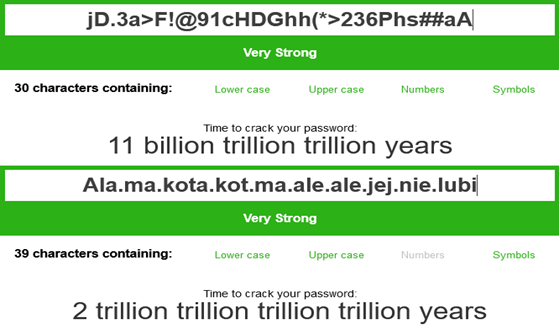
Conclusion? Cracking a long, easy-to-remember password takes significantly longer than a shorter, randomly generated one.
MFA – Multi-Factor Authentication
A password isn't the only line of defense. Many websites currently offer the option of configuring multi-factor authentication. In addition to a password, you can set an additional authentication method.
Such methods include:
- Security Question – an additional question related to the account owner. These include questions such as your place of birth or your favorite color. This is the least secure of the methods listed. Often, there are only a few such questions, making the chance of a hacker finding the answer is high.
- Phone Number Authentication – a code sent via SMS or a phone call to the user's phone number. This solution is better than a security question, but it is still vulnerable to phishing attempts.
- Additional App – a code displayed in an app on another device (e.g., smartphone, tablet) or an in-app notification, requiring confirmation of the user's login attempt. This solution provides better protection against phishing than a security question or phone number authentication.
- Biometrics – fingerprint scanning, facial recognition, or voice recognition. This method requires additional devices such as a fingerprint reader or camera (most current computers and smartphones have them built-in). This authentication method can be used alongside other methods. For example, to log in to your Google account on an iPhone, you only need to enter your password and confirm your login in the authentication app once. From now on, you won't be asked to repeat the process every time you check your email. Instead, your phone will unlock using your fingerprint or facial scan.
- Hardware keys – additional authentication devices (usually connected to a USB port) that are currently the best protection against phishing. Login requires the user to physically touch the key (touch the key in the designated area).
If you have the option to use MFA, don't hesitate! It will significantly increase the security of your accounts. Even if someone knows your password, they won't use it without a second authentication method.
Password Manager
Remember that it's good practice to create a unique password for each account you use.
The average user may have a dozen or dozens of accounts on different services. So how do you remember dozens of different passwords? Password manager software helps you securely store your passwords. Instead of remembering all your passwords, you only need to remember a single password for the manager. There are a lot of such software available on the market today. Most software providers require a purchase or subscription, but they also offer free plans (though these are very limited).
Typically, most password managers offer features such as:
- Secure cloud storage of encrypted passwords
- Secure password generation
- Password leak detection
Depending on the software you use, you can also expect features such as:
- Phishing protection
- Easy multi-factor authentication
- Storage of other sensitive data (credit card, personal information, etc.)
It's worth checking out software like 1Password, Dashlane, and LastPass. These programs have many features that can prove extremely useful.
How do I know if my password has been compromised?
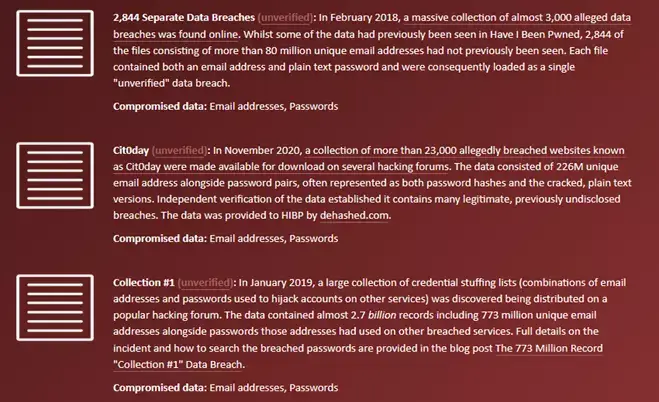
You'll find many solutions online to help you check if your password is still secure. One such tool is haveibeenpwned.com. It allows you to check whether a password associated with an email address may have been compromised. Simply enter your email address or phone number and generate a report. In addition to the information whether our password has been leaked, we also receive other data such as: date of leak, name and surname, home address, and telephone number.
In summary, to ensure your passwords are more secure, follow these steps:
- Use long, easy-to-remember passwords
- Avoid common passwords and phrases
- Use multi-factor authentication
- Regularly check your password for compromise
- Use unique passwords for different accounts
- Use a password manager
Support Online, an IT company, has been offering professional IT services to businesses for over 20 years. To ensure customer security, we have implemented ISO/IEC 27001 standards. Our extensive experience has allowed us to develop methods and solutions to best meet customer expectations. We take a personalized approach, ensuring the solutions we offer will help your business grow.
Build an outsourced IT department with us! We will ensure data security, provide user support, and advise you on how to make your business run more efficiently.
Have any questions? Call or email us.
our
support.
 What IT solutions do we use at Support Online?
When is it worth using an IT company?
Why is it worth hiring an IT company rather than a freelance IT specialist?
What are the advantages of working with IT Support Online?
What IT solutions do we use at Support Online?
When is it worth using an IT company?
Why is it worth hiring an IT company rather than a freelance IT specialist?
What are the advantages of working with IT Support Online?
An IT company, or IT firm, deals with information technology in a broad sense. This includes, among other things:
- Software design and development: An IT company can create custom applications for other companies or software products for the mass market. Depending on their specialization, these can include mobile applications, desktop applications, web applications, or embedded systems.
- Consulting services: An IT company often provides experts to advise on implementing new technologies, optimizing business processes, or selecting appropriate technological solutions.
- Cloud solutions: Many IT companies specialize in implementing and managing cloud solutions, such as data storage, application hosting, and data analysis platforms.
- IT security: Protection against cyberattacks, security audits, implementing security policies, and network monitoring are just some of the IT companies' responsibilities in this area.
- IT infrastructure management: In this area, a company may manage servers, databases, networks, and endpoints.
- Technical Support and Service: An IT company may provide support for its own products or general IT support for other companies, managing their technology on a daily basis.
- Training: Many IT providers also offer training in software use and secure technology use.
- Hardware Solutions: Some IT companies may also provide and configure computer, server, or network hardware.
Depending on their specialization and size, an IT company may offer one, several, or all of the above solutions. When choosing a provider, it's important to thoroughly understand their services and tailor them to your individual needs.
At Support Online, we have been supporting companies for years with
- comprehensive user support (both on-site and remotely),
- we service computers, phones, tablets, and related network issues,
- we specialize in server administration: Windows, Linux/Unix,
- we support virtualizers such as KVM, Hyper-V, VMWare, and Proxmox,
- we support cloud services, particularly solutions such as Azure, Microsoft 365, and AWS,
- we monitor servers and devices on the internet,
- we consult on development, DRP, and support the stability of your business in the IT layer.
If you're looking for a good IT company, Support Online is the right place to grow your business.
It's worth using an IT company like Support Online when:
- You plan to implement new technologies or software in your company.
- You need specialized technology consulting.
- You want to optimize existing IT processes.
- You struggle with digital security issues.
- You need support in managing your IT infrastructure.
- You lack internal resources or expertise to implement certain technology projects.
Using external IT experts can bring benefits in terms of saving time and resources, and ensuring high-quality solutions.
Hiring an IT company like Support Online offers several key benefits over an IT freelancer:
- Support from the entire team: An IT company has a full team of specialists, from DevOps specialists and Cyber Security Specialists to IT Helpdesk Specialists, who possess diverse skills and experience, enabling faster problem resolution and the implementation of more complex projects.
- Reliability and stability: IT companies have an established reputation and track record, which can translate into greater reliability and stability of services.
- Maintenance and support: An IT company can offer service contracts, warranties, and after-sales support, which may be more difficult to obtain from an individual freelancer.
- Resources: Companies have access to more resources, tools, and technologies that can accelerate and improve project execution.
- Long-term availability: The risk of a freelancer disappearing or changing careers is greater than the risk of a well-established company going out of business.
However, it's worth noting that the choice between a company and a freelancer depends on your specific needs and situation. If you value peace of mind and a quick response to unexpected problems, it is worth choosing an IT company such as Support Online.
Partnering with IT Support Online offers the following advantages:
- Professional IT outsourcing: The company guarantees high-quality IT outsourcing services for businesses of all sizes.
- Comprehensive IT support: IT Support Online provides comprehensive IT support that meets the diverse needs of businesses.
- Saves time and money: With our support, clients can focus on their core business activities while reducing the costs associated with information technology management.
- Serving a diverse range of businesses: The company specializes in serving both small and medium-sized enterprises and large corporations, demonstrating its flexibility and ability to adapt to diverse client needs.
- Leadership in IT outsourcing: The company is recognized as a leader in IT outsourcing, particularly in the Poznań and Warsaw regions.
By partnering with our company, IT Support Online, businesses can count on a high standard of service and professionalism at every stage of the relationship.


